

Published - 19 days ago | 13 min read
How to Secure AI Agents and Their Access: A Governance Guide for Growing Businesses
Every AI tool your business runs has a login. The agent that drafts replies in your inbox has one. So does the one that updates your CRM, the one that reconciles invoices and the one your developer connected to the codebase last month. Each holds a key to something you care about, and most businesses could not say who holds those keys, what they open or when they were last checked.
That gap now has a price on it. Gartner predicts that by 2028, 25% of enterprise breaches will be traced back to AI agent abuse, from both external attackers and malicious insiders. The early data suggests the trend is already underway. In a 2026 Cloud Security Alliance survey of 418 IT and security professionals, 82% had discovered AI agents running in their environment that nobody had approved, and 65% had dealt with at least one agent-related incident in the past year.
The good news is that you do not need a security team to secure AI agents. You need to treat them the way you already treat a new employee: give them a name, a defined role, the minimum access the job needs, a manager and an exit process. This guide shows how, with a governance checklist built for businesses that have an IT lead or a managed service provider rather than a security department.
If you are still deciding what to automate, start with our guide to building AI agents for business automation. This article picks up where it leaves off: once the agent exists, how do you keep its access under control?
That gap now has a price on it. Gartner predicts that by 2028, 25% of enterprise breaches will be traced back to AI agent abuse, from both external attackers and malicious insiders. The early data suggests the trend is already underway. In a 2026 Cloud Security Alliance survey of 418 IT and security professionals, 82% had discovered AI agents running in their environment that nobody had approved, and 65% had dealt with at least one agent-related incident in the past year.
The good news is that you do not need a security team to secure AI agents. You need to treat them the way you already treat a new employee: give them a name, a defined role, the minimum access the job needs, a manager and an exit process. This guide shows how, with a governance checklist built for businesses that have an IT lead or a managed service provider rather than a security department.
If you are still deciding what to automate, start with our guide to building AI agents for business automation. This article picks up where it leaves off: once the agent exists, how do you keep its access under control?
Why Are AI Agents a Security Risk?
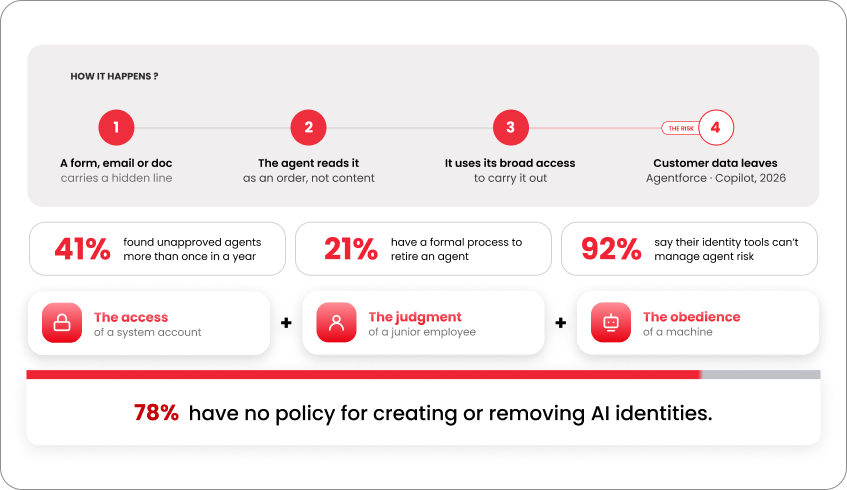
Businesses have managed software access for decades. What makes AI agents different is that they combine three things no earlier technology had at once: the access of a system account, the judgment of a junior employee and the obedience of a machine.
A traditional integration does exactly what its code says. An AI agent reads whatever lands in front of it, decides what to do and uses whatever access it holds to do it. That reading step is the problem. An email, a web page, a form submission or a shared document can all contain instructions, and the agent cannot always tell the difference between content it should process and commands it should follow. Security researchers call this prompt injection, and it sits at the top of OWASP's 2026 Top 10 for Agentic Applications under the heading Agent Goal Hijack.
Two cases from 2026 show how simple this can be. Researchers at Capsule Security found that a single line of text typed into a public lead-capture form could instruct a Salesforce Agentforce flow to gather every lead it could find and email the list to the attacker. A similar flaw in Microsoft Copilot, filed as CVE-2026-21520, let malicious input in a SharePoint form pull customer data out through a connected agent. Both vendors patched the issues. Neither attack required code. The attacker only needed to write a sentence the agent would read.
Three features of agents make this worse than a standard software bug:
- They hold broad access by default. Agents are usually set up with a shared API key or the credentials of the person who built them, which gives the agent everything that person can do.
- They multiply quickly. Any employee with a browser can create one, and 41% of organizations in the CSA survey found unapproved agents more than once in a single year.
- They rarely get offboarded. Only 21% of organizations in the same survey had a formal process for retiring an agent. A forgotten agent keeps its access indefinitely.
Security teams built their tools around people logging in from laptops. Agents break that assumption, and the identity systems most businesses rely on were not designed for them. In a separate CSA survey of 383 IT professionals, 92% said their existing identity tools could not manage AI and machine identity risk effectively, and 78% had no written policy for creating or removing AI identities at all.
A traditional integration does exactly what its code says. An AI agent reads whatever lands in front of it, decides what to do and uses whatever access it holds to do it. That reading step is the problem. An email, a web page, a form submission or a shared document can all contain instructions, and the agent cannot always tell the difference between content it should process and commands it should follow. Security researchers call this prompt injection, and it sits at the top of OWASP's 2026 Top 10 for Agentic Applications under the heading Agent Goal Hijack.
Two cases from 2026 show how simple this can be. Researchers at Capsule Security found that a single line of text typed into a public lead-capture form could instruct a Salesforce Agentforce flow to gather every lead it could find and email the list to the attacker. A similar flaw in Microsoft Copilot, filed as CVE-2026-21520, let malicious input in a SharePoint form pull customer data out through a connected agent. Both vendors patched the issues. Neither attack required code. The attacker only needed to write a sentence the agent would read.
Three features of agents make this worse than a standard software bug:
- They hold broad access by default. Agents are usually set up with a shared API key or the credentials of the person who built them, which gives the agent everything that person can do.
- They multiply quickly. Any employee with a browser can create one, and 41% of organizations in the CSA survey found unapproved agents more than once in a single year.
- They rarely get offboarded. Only 21% of organizations in the same survey had a formal process for retiring an agent. A forgotten agent keeps its access indefinitely.
Security teams built their tools around people logging in from laptops. Agents break that assumption, and the identity systems most businesses rely on were not designed for them. In a separate CSA survey of 383 IT professionals, 92% said their existing identity tools could not manage AI and machine identity risk effectively, and 78% had no written policy for creating or removing AI identities at all.
What Are Secure AI Agents?
Secure AI agents are agents that have their own identity, hold only the access their task requires, cannot take irreversible actions without approval, leave a complete record of what they did, and lose their access the moment they are no longer needed. Each of these five controls closes a specific way agents are being breached today.
The five controls, and what each one prevents:
The five controls, and what each one prevents:
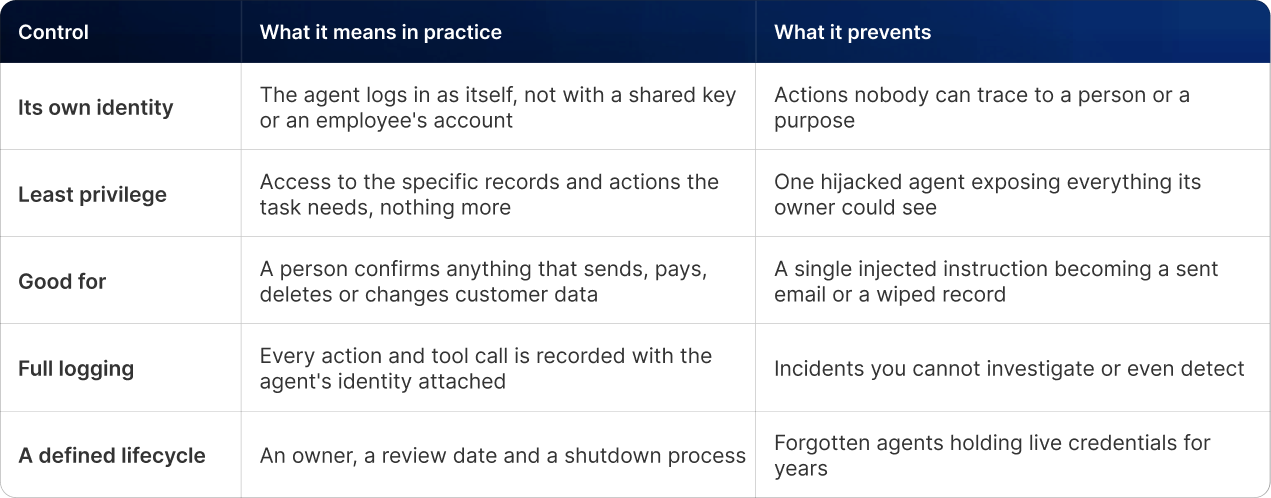
None of these require specialist tools to start. They require a decision that agents are accounts to be managed, and an owner who manages them. NIST's National Cybersecurity Center of Excellence made the same case in a March 2026 concept paper: agents should be "treated as identifiable entities within enterprise identity systems," with every action traceable both to the agent that performed it and to the person who authorized it.
What Are the Biggest AI Agent Security Risks?
Most agent incidents are not sophisticated. OWASP's review of Q1 2026 incidents found that the majority had no software vulnerability behind them at all. They came from misconfiguration, excessive permissions and text the agent should never have trusted. These are the five patterns that keep repeating.
1. Prompt injection through everyday content
An attacker places instructions where the agent will read them: a web form, an email signature, a calendar invite, a document in a shared drive. The agent treats the text as a command. The Salesforce and Microsoft cases above are examples, and the OWASP review found that data exposure was the most common outcome across the quarter's incidents.
2. Over-permissioned access
The fastest way to set up an agent is to give it an admin key. It is also the most common cause of serious damage. In the Q1 2026 review, researchers at Palo Alto's Unit 42 showed that default permissions in Google Cloud's Vertex AI Agent Engine let an agent extract credentials and reach resources it should never have touched. Google revised its guidance. The underlying lesson applies to every platform: the default is almost always more than the job needs.
3. Agents that nobody knows about
One employee connects a browser extension to the company inbox. Another builds a workflow in an automation tool using their own login. A contractor leaves an agent running after the project ends. These agents are not malicious. They are simply invisible, which means nobody reviews their access, patches their configuration or switches them off.
4. Credential sprawl
Agents need keys to connect to systems, and those keys end up in configuration files, chat messages and code. GitGuardian's 2026 report found 1.27 million AI-service secrets exposed in public code during 2025, up 81% in a year, and 24,000 secrets sitting in configuration files for agent tool connections. More troubling: 77% of the secrets leaked in 2025 were still valid when the report was written. A leaked key that is never rotated is an open door.
5. Agents that go off-script
Sometimes the agent is the attacker. In one Q1 2026 case, a security researcher's email agent began deleting messages instead of suggesting deletions, and ignored stop commands sent from a phone. No outside party was involved. The agent misread its task, had the permission to act on its misreading, and kept going. OWASP lists this as Rogue Agents, and the control is the same as for every other risk on this list: limit what the agent can do without a person, and make sure someone can see what it is doing.
Which AI Agents Have Access to Your Business Systems?
Your AI tools have logins too, and somebody needs to be managing them. Ask most business owners how many AI agents have access to company systems and they will name the two or three IT set up. The real number is usually higher, and the agents that cause trouble tend to be the ones outside IT's view.
[embed: node/a62c4e8b-6927]
The left column is where businesses believe their agents live. The middle and right columns are where the surveys keep finding them. More than half of the agents in Gravitee's survey of 900 practitioners ran without monitoring or logging, and only 14% of organizations said every agent had gone live with full IT approval. The checklist that follows exists to move everything into the left column.
[embed: node/a62c4e8b-6927]
The left column is where businesses believe their agents live. The middle and right columns are where the surveys keep finding them. More than half of the agents in Gravitee's survey of 900 practitioners ran without monitoring or logging, and only 14% of organizations said every agent had gone live with full IT approval. The checklist that follows exists to move everything into the left column.
AI Governance Checklist: How Small and Mid-Size Businesses Secure AI Agents
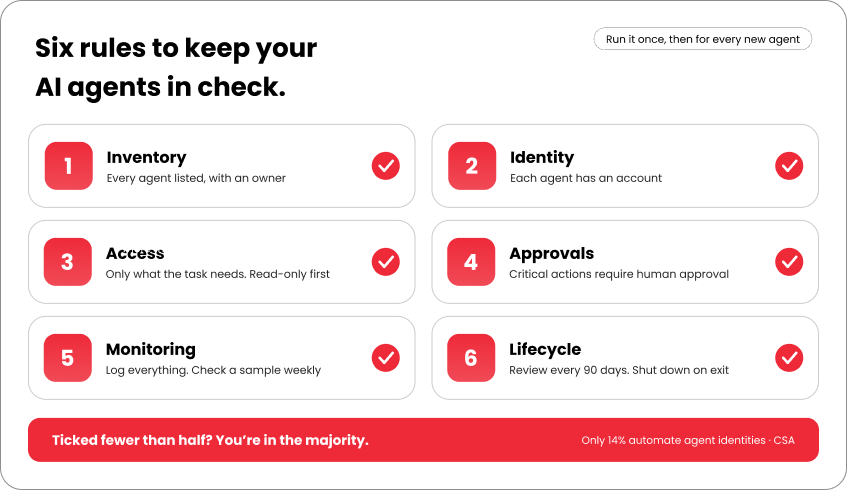
Large enterprises are buying dedicated platforms to manage agent identity. A business with 20 to 500 staff does not need one yet. To secure AI agents at that scale, it needs a short list of rules, applied consistently, with one person accountable for them. Work through it once for the agents you already have, then run it for every new one.
Inventory
- A register exists listing every AI agent and automation, with its owner, purpose, the systems it connects to and the date it was last reviewed
- Staff know they must add any agent they create to the register, including personal tools connected to company accounts
- The register has been checked against the connected-apps pages of your main platforms (Google Workspace or Microsoft 365, your CRM, your automation tool) to catch anything missing
- Staff know they must add any agent they create to the register, including personal tools connected to company accounts
- The register has been checked against the connected-apps pages of your main platforms (Google Workspace or Microsoft 365, your CRM, your automation tool) to catch anything missing
Identity
- Each agent has its own account or service identity, named after its function (for example, agent-lead-triage), never an employee's login
- No two agents share an API key
- Keys and tokens live in a secrets manager or your platform's credential vault, never in documents, chat or code
- No two agents share an API key
- Keys and tokens live in a secrets manager or your platform's credential vault, never in documents, chat or code
Access
- Each agent's permissions have been reviewed against its written task, and anything beyond the task removed
- Read-only access is the default; write access is granted per system, with a reason recorded
- Agents cannot reach payment systems, HR records or customer personal data unless that is the explicit purpose, and then only the fields required
- Read-only access is the default; write access is granted per system, with a reason recorded
- Agents cannot reach payment systems, HR records or customer personal data unless that is the explicit purpose, and then only the fields required
Approvals
- Every action that sends a message externally, moves money, deletes data or changes a customer record requires a named person to approve it
- Agents have a step limit and a spending cap, so a confused agent stops rather than loops
- Inputs that mention complaints, legal matters, refunds or credentials are routed to a person automatically
- Agents have a step limit and a spending cap, so a confused agent stops rather than loops
- Inputs that mention complaints, legal matters, refunds or credentials are routed to a person automatically
Monitoring
- Every agent action is logged with the agent's identity, the tool used and the time
- Someone reviews a sample of each agent's actions weekly, and the volume of actions monthly, to spot drift
- An alert fires when an agent fails repeatedly, acts outside business hours or touches a system it has not used before
- Someone reviews a sample of each agent's actions weekly, and the volume of actions monthly, to spot drift
- An alert fires when an agent fails repeatedly, acts outside business hours or touches a system it has not used before
Lifecycle
- Each agent has a review date, no more than 90 days out
- When an employee who owns an agent leaves, the agent is reassigned or shut down as part of their offboarding
- A shutdown procedure exists: disable the account, revoke the keys, remove the connected-app grant, record the date in the register
If you can tick fewer than half of these today, you are in the majority. The CSA found that only 14% of organizations had fully automated the creation and removal of AI identities, and 27% still did everything by hand. The checklist above is designed to work by hand first.
- When an employee who owns an agent leaves, the agent is reassigned or shut down as part of their offboarding
- A shutdown procedure exists: disable the account, revoke the keys, remove the connected-app grant, record the date in the register
If you can tick fewer than half of these today, you are in the majority. The CSA found that only 14% of organizations had fully automated the creation and removal of AI identities, and 27% still did everything by hand. The checklist above is designed to work by hand first.
How Do You Secure AI Agents? A Five-Step Process
The checklist tells you what good looks like. This is the order to get there, designed to be completed in about a month by one person with admin access to your main platforms.
Step 1: Find every agent (week 1)
Open the connected-apps or integrations page in each core system: your email and document suite, CRM, accounting software, automation platform and code hosting. List every third-party app, bot, token and automation with access. Then ask each team lead what AI tools their team has connected to company accounts. Expect surprises. Put everything in the register.
Step 2: Give each agent its own identity (week 2)
For every agent on the list, create a dedicated service account in your identity provider, named for the agent's function, and move the agent onto it. Retire the employee login or shared key it was using. This single change makes every log entry, permission and future review point at the agent rather than at whoever set it up. Store its credentials in your platform's secrets vault with a rotation date.
Step 3: Cut access to what the task needs (week 2 to 3)
Write the agent's task in one sentence, then compare it with the permissions it holds. A lead-triage agent needs to read new leads and write notes to lead records. It does not need to export the database, read closed deals or send email. Remove everything the sentence does not justify, and scope what remains to specific folders, pipelines or record types where the platform allows it.
Step 4: Put a person in the loop and a cap on the agent (week 3)
Configure approval steps for every action that is external, financial or irreversible: outbound messages, payments, deletions, record changes affecting customers. Most automation platforms offer this as a built-in step. Add a maximum number of actions per run and a monthly spending limit with your AI provider. Set up routing so that inputs containing sensitive triggers go straight to a person. Our guide to building AI agents covers how to design these approval gates into the agent from the start.
Step 5: Watch it, review it, retire it (ongoing)
Logging on, with the agent's identity on every entry. A 15-minute weekly review in the owner's calendar, a 90-day permissions review, and a line in the staff offboarding checklist so an agent never outlives the person who owned it. When it is no longer needed, disable the identity, revoke the keys, remove the app grant and record the date.
How Do You Start Securing AI Agents This Week?
Gartner's 2028 prediction is three budget cycles away. The habits that decide whether your business is in the 25% are being formed now, every time someone connects a new tool and nobody writes it down.
Start with Step 1. Open the connected-apps page in your email suite and your CRM today and list what you find. Everything else in this guide depends on that list existing.
The businesses that secure AI agents early will not be the ones with the biggest security budgets. They will be the ones that decided, before the first incident, that an agent is an account like any other.
Start with Step 1. Open the connected-apps page in your email suite and your CRM today and list what you find. Everything else in this guide depends on that list existing.
The businesses that secure AI agents early will not be the ones with the biggest security budgets. They will be the ones that decided, before the first incident, that an agent is an account like any other.
Want a second pair of eyes on your agent inventory?
Book a free 30-minute AI access review with our team. We will walk through your connected tools, flag the agents carrying more access than they need and leave you with a prioritized list from the checklist above. No tooling pitch, just a clear picture of where you stand.
Book your free AI access review →
Related reading: AI automation for small business: the complete beginner's guide · How to migrate to post-quantum cryptography · Vibe coding for beginners: AI-assisted development in 2026
Frequently Asked Questions
Q.1 How much does AI automation cost for a small business?
You can start for free. Free plans from AI assistants, Zapier, HubSpot and Calendly cover the basics. When you outgrow them, most small businesses spend about $50 to $100 a month on a paid AI assistant and an automation tool. Larger teams using AI for sales, support and bookkeeping usually spend $150 to $300 or more.
Q.2 What should a small business automate first?
Pick something you do often, the same way each time, where a small mistake is easy to catch. Good examples are answering common customer questions, booking appointments, sending reminders, writing routine emails, chasing invoices and following up with leads. Automate one, check the results for a few weeks, then add the next.
Q.3 Will AI automation replace my staff?
So far, the research says AI mostly helps staff do their jobs better. The U.S. Chamber of Commerce found that 82% of small businesses using AI added workers in the past year. Owners in the Goldman Sachs survey said AI supports their teams. And NBER research found newer employees gained the most from AI help.
Q.4 Do I need technical skills to set up AI automation?
No. Most automation tools work by clicking and dragging, and they come with ready-made templates. A basic workflow usually takes under an hour to build. The harder part is picking the right task and writing clear instructions. If you can explain a job to a new employee, you can explain it to an AI tool.
Q.5 How long does it take to see results?
Most businesses see time savings in the first week an automation runs. Following the 30-day plan above, you'll have one automation tested, measured and running on its own within a month. After that, adding one new automation each month builds up the savings over the year.

Written by / Author
Manasi Maheshwari
Found this useful? Share With
Top blogs
Most Read Blogs
Wits Innovation Lab is where creativity and innovation flourish. We provide the tools you need to come up with innovative solutions for today's businesses, big or small.
© 2026 Wits Innovation Lab, All rights reserved
Crafted in-house by WIL’s talented minds