

Published - 2 months ago | 16 min read
Vibe Coding Tutorial for Beginners: A Step-by-Step Guide to AI-Assisted Development in 2026
Collins Dictionary named "vibe coding" its Word of the Year for 2025. Eight months later, Gartner put the enterprise market for AI coding agents at roughly ten billion dollars in annualized value. Google and Kaggle ran a free five-day course built entirely around it.
Adoption is settled. Trust is not. Only 29% of developers say they trust the accuracy of AI output, and that number went down, not up, as the tools got better.
That tension is the real story, and most beginner guides skip it. They show you how to type a prompt and watch an app appear. Very few show you week three, when the app breaks and you cannot read the code well enough to fix it.
This vibe coding tutorial for beginners covers both halves. What vibe coding is, how to get started, which tools are worth your time, and why the people who use these tools most are the ones most careful about them.
Adoption is settled. Trust is not. Only 29% of developers say they trust the accuracy of AI output, and that number went down, not up, as the tools got better.
That tension is the real story, and most beginner guides skip it. They show you how to type a prompt and watch an app appear. Very few show you week three, when the app breaks and you cannot read the code well enough to fix it.
This vibe coding tutorial for beginners covers both halves. What vibe coding is, how to get started, which tools are worth your time, and why the people who use these tools most are the ones most careful about them.
What Is Vibe Coding, and What Does It Mean in 2026?
Vibe coding is building software by describing what you want in plain language and letting an AI model write the code. You direct the outcome. The model handles the syntax.
Collins Dictionary named it Word of the Year for 2025, defining it as the use of artificial intelligence prompted by natural language to write computer code. Collins described the shift as programming by vibes rather than variables.
That definition is the popular one. The technical community uses a stricter one, which matters a great deal for beginners.
Collins Dictionary named it Word of the Year for 2025, defining it as the use of artificial intelligence prompted by natural language to write computer code. Collins described the shift as programming by vibes rather than variables.
That definition is the popular one. The technical community uses a stricter one, which matters a great deal for beginners.
Who Coined the Term Vibe Coding?
Andrej Karpathy, a founding member of OpenAI and the former director of AI at Tesla, posted the term on February 2, 2025. He described a way of working where you stop reading the diffs, paste error messages back in without comment, and let the code grow past your own comprehension. He framed the appeal as being able to forget the code even exists.
Karpathy was describing weekend projects. The term escaped that context almost immediately.
Karpathy was describing weekend projects. The term escaped that context almost immediately.
How Is Vibe Coding Different From Agentic Engineering?
In February 2026, Karpathy declared his own term outdated. Writing on X and covered by The New Stack, he proposed agentic engineering as the professional successor. His framing was that you are no longer writing code directly most of the time. You are orchestrating agents and acting as oversight.
The distinction is about accountability. Vibe coding accepts output. Agentic engineering directs, reviews, and verifies it.
Simon Willison, one of the most widely read practitioners in this space, drew the line even earlier. If you reviewed, tested, and understood every line an LLM wrote, that is not vibe coding. He calls that using the model as a typing assistant. Both definitions are useful. Vibe coding is the on-ramp. Agentic engineering is the destination.
The distinction is about accountability. Vibe coding accepts output. Agentic engineering directs, reviews, and verifies it.
Simon Willison, one of the most widely read practitioners in this space, drew the line even earlier. If you reviewed, tested, and understood every line an LLM wrote, that is not vibe coding. He calls that using the model as a typing assistant. Both definitions are useful. Vibe coding is the on-ramp. Agentic engineering is the destination.
Is Vibe Coding the Same as AI-Assisted Development?
No. AI-assisted development is the broad category and covers everything from autocomplete to autonomous agents. Vibe coding is one mode inside it, defined by the absence of code review.
Professional developers understand this difference clearly. In the 2025 Stack Overflow Developer Survey, which collected responses from more than 49,000 developers across 177 countries, 72% said vibe coding is not part of their professional development work. Those same developers overwhelmingly use AI tools. They just do not accept the output unread.
Professional developers understand this difference clearly. In the 2025 Stack Overflow Developer Survey, which collected responses from more than 49,000 developers across 177 countries, 72% said vibe coding is not part of their professional development work. Those same developers overwhelmingly use AI tools. They just do not accept the output unread.
How Big Is Vibe Coding in 2026?
Big enough that the interesting question is no longer whether to use these tools.
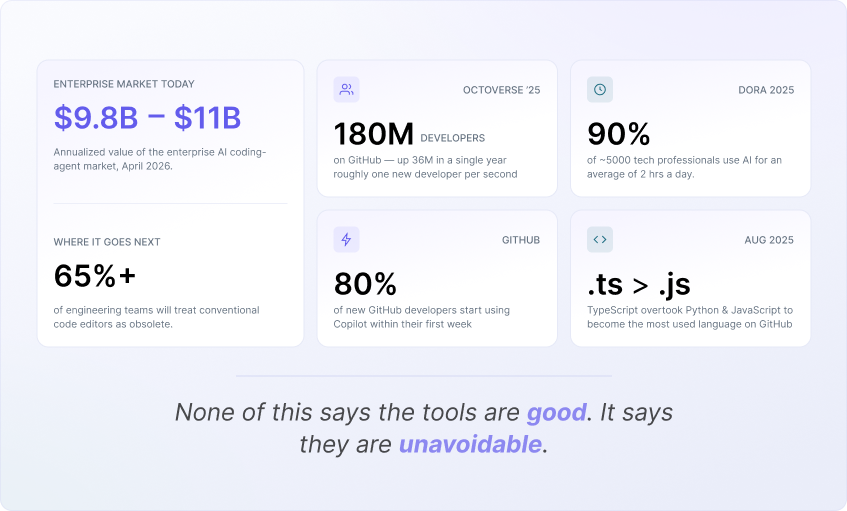
Gartner estimated the enterprise AI coding agent market at roughly $9.8 billion to $11.0 billion in annualized value as of April 2026. Gartner also predicts that by 2027, more than 65% of engineering teams using agentic coding will treat the traditional code editor as optional rather than required.
The platform data points the same direction. GitHub's Octoverse 2025 report recorded 180 million developers on the platform, with 36 million joining in a single year, roughly one per second. Around 80% of new developers on GitHub start using Copilot within their first week. TypeScript overtook Python and JavaScript to become the most-used language on GitHub in August 2025, a shift GitHub attributes partly to type systems giving AI models better guardrails.
Google's 2025 DORA report, based on nearly 5,000 technology professionals, found 90% now use AI in daily development work, spending a median of two hours a day alongside it.
None of that tells you the tools are good. It tells you the tools are unavoidable.
Gartner estimated the enterprise AI coding agent market at roughly $9.8 billion to $11.0 billion in annualized value as of April 2026. Gartner also predicts that by 2027, more than 65% of engineering teams using agentic coding will treat the traditional code editor as optional rather than required.
The platform data points the same direction. GitHub's Octoverse 2025 report recorded 180 million developers on the platform, with 36 million joining in a single year, roughly one per second. Around 80% of new developers on GitHub start using Copilot within their first week. TypeScript overtook Python and JavaScript to become the most-used language on GitHub in August 2025, a shift GitHub attributes partly to type systems giving AI models better guardrails.
Google's 2025 DORA report, based on nearly 5,000 technology professionals, found 90% now use AI in daily development work, spending a median of two hours a day alongside it.
None of that tells you the tools are good. It tells you the tools are unavoidable.
Should Beginners Learn Vibe Coding, or Learn to Code First?
Learn both, in that order, on purpose. Start with vibe coding to build something real in your first week. Then use the code the AI produced as your curriculum.
This sequence works because motivation is the scarcest resource in learning to program. A working app you built on day two is a better teacher than three weeks of syntax exercises. The risk is stopping there.
This sequence works because motivation is the scarcest resource in learning to program. A working app you built on day two is a better teacher than three weeks of syntax exercises. The risk is stopping there.
What Does the Research Actually Say About AI Coding Productivity?
The evidence is mixed and improving, and you should be skeptical of anyone who tells you otherwise.
The most rigorous single study cuts against the hype. In July 2025, the nonprofit research group METR ran a randomized controlled trial with 16 experienced open-source developers across 246 real tasks in repositories they already knew well. The developers predicted AI would make them 24% faster. They were 19% slower. After finishing, they still believed they had been 20% faster.
That gap between felt speed and measured speed is the single most important thing a beginner can internalize.
METR revisited the question with a larger group in late 2025 and published its findings in February 2026. The results now point toward a real speedup, though the researchers flagged serious selection effects: a growing share of developers simply refused to participate in a study that required them to work without AI. METR's own read is that developers are likely faster in 2026 than they were in early 2025, and that its data is weak evidence for how much.
The DORA research adds the organizational version of the same finding. AI amplifies whatever system it lands in. Strong teams get faster. Dysfunctional teams get faster at being dysfunctional.
The most rigorous single study cuts against the hype. In July 2025, the nonprofit research group METR ran a randomized controlled trial with 16 experienced open-source developers across 246 real tasks in repositories they already knew well. The developers predicted AI would make them 24% faster. They were 19% slower. After finishing, they still believed they had been 20% faster.
That gap between felt speed and measured speed is the single most important thing a beginner can internalize.
METR revisited the question with a larger group in late 2025 and published its findings in February 2026. The results now point toward a real speedup, though the researchers flagged serious selection effects: a growing share of developers simply refused to participate in a study that required them to work without AI. METR's own read is that developers are likely faster in 2026 than they were in early 2025, and that its data is weak evidence for how much.
The DORA research adds the organizational version of the same finding. AI amplifies whatever system it lands in. Strong teams get faster. Dysfunctional teams get faster at being dysfunctional.
What Can You Realistically Build With No Coding Experience?
You can build these well:
- Internal tools and dashboards for a small team
- Personal utilities, trackers, and calculators
- Landing pages and marketing sites
- Prototypes and clickable demos for validating an idea
- Simple CRUD applications where the cost of a bug is low
You should not attempt these alone yet:
- Anything handling payments
- Anything storing personal, health, or financial data
- Authentication systems built from scratch
- Applications where downtime costs money or trust
The dividing line is consequence. Vibe coding is excellent where mistakes are cheap and reversible.
- Internal tools and dashboards for a small team
- Personal utilities, trackers, and calculators
- Landing pages and marketing sites
- Prototypes and clickable demos for validating an idea
- Simple CRUD applications where the cost of a bug is low
You should not attempt these alone yet:
- Anything handling payments
- Anything storing personal, health, or financial data
- Authentication systems built from scratch
- Applications where downtime costs money or trust
The dividing line is consequence. Vibe coding is excellent where mistakes are cheap and reversible.
What Are the Best Vibe Coding Tools for Beginners in 2026?
The best vibe coding tools split into two categories, and picking from the wrong one is the most common beginner mistake.
Prompt-to-app builders generate and host complete applications from a description. AI-native code editors and terminal agents work on real codebases you own. The first group gets you to a working product fastest. The second group produces code you can maintain.
Prompt-to-app builders generate and host complete applications from a description. AI-native code editors and terminal agents work on real codebases you own. The first group gets you to a working product fastest. The second group produces code you can maintain.
What Are the Best Vibe Coding Tools If You Have Never Written Code?
- Lovable produces the most polished-looking full-stack applications from a plain description and exports to GitHub, so you are not locked in when you outgrow it.
- Bolt.new is the fastest path from idea to working prototype in a browser tab. Treat its output as a demo rather than a foundation.
- Replit bundles the editor, the AI agent, the database, and the hosting into a single tab. It is the strongest option for learning, because you can see the file structure while the agent works.
- Google AI Studio is free and good for experimentation, including native Android app generation added at Google I/O in May 2026
- Bolt.new is the fastest path from idea to working prototype in a browser tab. Treat its output as a demo rather than a foundation.
- Replit bundles the editor, the AI agent, the database, and the hosting into a single tab. It is the strongest option for learning, because you can see the file structure while the agent works.
- Google AI Studio is free and good for experimentation, including native Android app generation added at Google I/O in May 2026
What Are the Best Vibe Coding Tools Once You Can Read Code?
- Claude Code is a terminal-based agent with the strongest reputation for multi-file reasoning and for writing tests without being asked. It has the steepest interface learning curve of the group and the highest ceiling.
- Cursor remains the reference AI-native code editor. It is a fork of VS Code, so everything you learn transfers, and it handles large refactors better than browser-based tools.
- GitHub Copilot is the safe default inside VS Code and JetBrains editors, particularly if you are working somewhere with procurement and compliance requirements.
- Devin Desktop is the product formerly called Windsurf. Cognition renamed it on June 2, 2026 and rebuilt the default interface around managing multiple agents at once. If you follow an older tutorial that references Windsurf, this is where you will land.
- Google Antigravity is an agent-first IDE built on a VS Code fork. Its distinguishing feature is browser verification: the agent opens a real browser, clicks through your app, and produces evidence that the feature works. Antigravity 2.0 shipped at Google I/O in May 2026.
- Cursor remains the reference AI-native code editor. It is a fork of VS Code, so everything you learn transfers, and it handles large refactors better than browser-based tools.
- GitHub Copilot is the safe default inside VS Code and JetBrains editors, particularly if you are working somewhere with procurement and compliance requirements.
- Devin Desktop is the product formerly called Windsurf. Cognition renamed it on June 2, 2026 and rebuilt the default interface around managing multiple agents at once. If you follow an older tutorial that references Windsurf, this is where you will land.
- Google Antigravity is an agent-first IDE built on a VS Code fork. Its distinguishing feature is browser verification: the agent opens a real browser, clicks through your app, and produces evidence that the feature works. Antigravity 2.0 shipped at Google I/O in May 2026.
Which Vibe Coding Tool Should You Actually Start With?
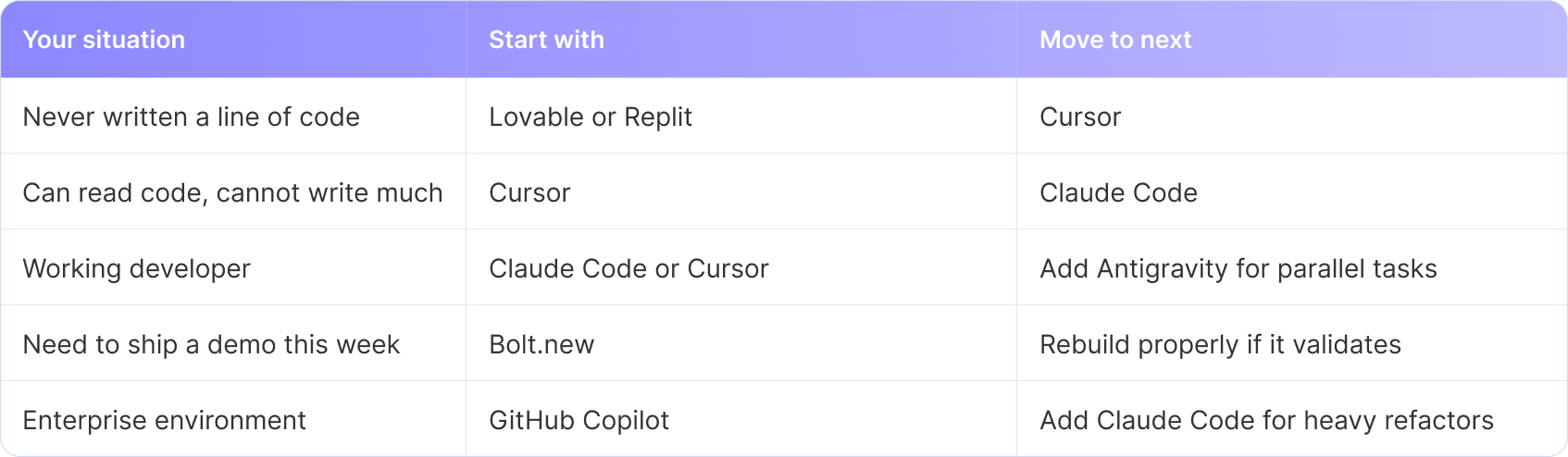
Most experienced practitioners run two of the best vibe coding tools together, one for fast generation and one for careful editing. Do not do that in your first month. Learn one well.
How Do You Start Vibe Coding? A Step-by-Step Tutorial
How Do You Start Vibe Coding? A Step-by-Step Tutorial
Step 1: How Do You Pick a First Project That Will Not Fail?
Pick something you personally need, that fits in one screen of description, and that nobody else depends on.
Good first projects: a habit tracker, an invoice generator for your freelance work, a dashboard that pulls one API, a tool that renames files in bulk.
Bad first projects: a social network, a marketplace, anything with the word platform in the pitch.
Scope is the variable you control. Ambition is what kills beginner projects, because the failure mode of AI coding tools is quiet drift across a large surface area.
Good first projects: a habit tracker, an invoice generator for your freelance work, a dashboard that pulls one API, a tool that renames files in bulk.
Bad first projects: a social network, a marketplace, anything with the word platform in the pitch.
Scope is the variable you control. Ambition is what kills beginner projects, because the failure mode of AI coding tools is quiet drift across a large surface area.
Step 2: How Do You Write a Spec Before You Write a Prompt?
Spending twenty minutes writing a specification is the highest-return habit in this entire guide. Spec-driven development emerged in 2025 as the direct answer to agents producing plausible code that drifts from intent, and by 2026 every major tool ships some version of it.
Your spec needs five things:
1. What the app does, in three sentences a stranger would understand
2. Who uses it and what they are trying to accomplish
3. The core screens or commands, listed
4. The data you are storing, listed by field
5. What is explicitly out of scope for version one
That last item does more work than the other four combined. Agents fill silence with assumptions. A written boundary is what stops a to-do list app from growing a notification system you never asked for.
Your spec needs five things:
1. What the app does, in three sentences a stranger would understand
2. Who uses it and what they are trying to accomplish
3. The core screens or commands, listed
4. The data you are storing, listed by field
5. What is explicitly out of scope for version one
That last item does more work than the other four combined. Agents fill silence with assumptions. A written boundary is what stops a to-do list app from growing a notification system you never asked for.
Step 3: How Do You Set Up an AGENTS.md File?
AGENTS.md is a plain markdown file at the root of your project that tells any coding agent how to work in your codebase. It was formalized as an open specification in August 2025 through work led by OpenAI with participation from Google, Cursor, and Factory, and donated to the Linux Foundation's Agentic AI Foundation in December 2025. As of that month, more than 60,000 open-source projects had adopted it and more than twenty AI coding tools could read it.
A useful beginner version has four sections:
- Commands: exactly how to install, run, test, and build. Copy-pasteable, with the real flags.
- Stack: languages, frameworks, and versions, stated plainly.
- Conventions: anything that differs from the default a model would assume.
- Boundaries: files and folders the agent must never touch. Environment files belong here.
Lead with commands. Agents act on instructions faster than they absorb explanations.
A useful beginner version has four sections:
- Commands: exactly how to install, run, test, and build. Copy-pasteable, with the real flags.
- Stack: languages, frameworks, and versions, stated plainly.
- Conventions: anything that differs from the default a model would assume.
- Boundaries: files and folders the agent must never touch. Environment files belong here.
Lead with commands. Agents act on instructions faster than they absorb explanations.
Step 4: How Do You Write a Prompt That Produces Usable Code?
Weak prompts describe a feeling. Strong prompts describe a contract.
A strong prompt names the file or module to change, states the desired behavior, states what must not change, and specifies how you will know it worked. Adding "write a test that fails before this change and passes after" to the end of a prompt changes the quality of the output more than any other single sentence.
Three habits that compound:
- One change per prompt. Bundled requests produce bundled bugs that are hard to isolate.
- Ask for the plan first. Have the agent describe its approach before it writes anything. Correcting a plan costs one message. Correcting a finished implementation costs an afternoon.
- Paste the actual error. Full stack trace, not your summary of it.
A strong prompt names the file or module to change, states the desired behavior, states what must not change, and specifies how you will know it worked. Adding "write a test that fails before this change and passes after" to the end of a prompt changes the quality of the output more than any other single sentence.
Three habits that compound:
- One change per prompt. Bundled requests produce bundled bugs that are hard to isolate.
- Ask for the plan first. Have the agent describe its approach before it writes anything. Correcting a plan costs one message. Correcting a finished implementation costs an afternoon.
- Paste the actual error. Full stack trace, not your summary of it.
Step 5: How Do You Review Code You Did Not Write?
This is the step beginners skip and the one that determines whether you are building a skill or a dependency.
You do not need to understand every line on day one. You need a routine:
- Read the diff before you accept it. Every time, even when it is long.
- Ask the agent to explain any block you cannot follow, then ask it what would break if that block were removed.
- Check what the change touched. Unexpected files in a diff are the earliest warning sign of drift.
- Keep a running list of concepts you did not recognize. That list is your syllabus.
Willison's framing is worth adopting as a goal. The point is not writing less code. The point is understanding more code per hour, because AI lets you read far more of it than you could before.
You do not need to understand every line on day one. You need a routine:
- Read the diff before you accept it. Every time, even when it is long.
- Ask the agent to explain any block you cannot follow, then ask it what would break if that block were removed.
- Check what the change touched. Unexpected files in a diff are the earliest warning sign of drift.
- Keep a running list of concepts you did not recognize. That list is your syllabus.
Willison's framing is worth adopting as a goal. The point is not writing less code. The point is understanding more code per hour, because AI lets you read far more of it than you could before.
Step 6: How Do You Test What the AI Built?
Ask for tests as part of the feature, not after it. Then verify the tests actually fail when the feature is broken, because a test that always passes is worse than no test.
Beyond automated tests, run the thing yourself. Click every button. Enter empty values, absurdly long values, and characters the field did not expect. AI-generated code tends to handle the path you described and to ignore every path you did not.
Commit to version control after every working change. Git is your undo button when an agent decides to refactor half your project without warning.
Beyond automated tests, run the thing yourself. Click every button. Enter empty values, absurdly long values, and characters the field did not expect. AI-generated code tends to handle the path you described and to ignore every path you did not.
Commit to version control after every working change. Git is your undo button when an agent decides to refactor half your project without warning.
Step 7: How Do You Deploy Without Exposing Yourself?
Before anything goes public:
- Confirm no API keys, tokens, or passwords appear anywhere in your source files
- Confirm your environment file is in .gitignore and was never committed
- Confirm the database your app talks to is not the same one holding anything real
- Run a security scanner over the codebase
- If the app has a login, have someone competent review that part specifically
Authentication, payments, and anything touching personal data are the three areas where the consensus in 2026 is unambiguous. Use an established provider or get a human expert to review it. Do not vibe code them from scratch.
- Confirm no API keys, tokens, or passwords appear anywhere in your source files
- Confirm your environment file is in .gitignore and was never committed
- Confirm the database your app talks to is not the same one holding anything real
- Run a security scanner over the codebase
- If the app has a login, have someone competent review that part specifically
Authentication, payments, and anything touching personal data are the three areas where the consensus in 2026 is unambiguous. Use an established provider or get a human expert to review it. Do not vibe code them from scratch.
Where Can You Learn Vibe Coding for Free?
Google and Kaggle built the most substantial free option, and they built it recently.
The 5-Day AI Agents Intensive Vibe Coding Course ran live from June 15 to 19, 2026, at no cost. Google announced it on April 27, 2026, as the follow-up to a November 2025 edition that reached more than 1.5 million learners. The 2026 version was rebuilt around vibe coding workflows specifically, treating natural language as the primary programming interface.
The curriculum runs day by day: agents and vibe coding fundamentals, tools and interoperability including external APIs and agent-to-agent communication, context engineering covering memory and token use, agent quality and security, and production deployment. Labs use Google's Antigravity 2.0. Each day pairs a whitepaper with a podcast and hands-on codelabs, at roughly one to two hours a day. There is an optional capstone project with a Kaggle certificate attached.
Course materials were published as a free self-paced guide on Kaggle in July 2026, so the live window closing does not lock you out. You need a free Kaggle account and a free Google AI Studio account.
Two things make this worth your time over a random YouTube playlist. The security and evaluation content is unusually serious for a free course. And the curriculum covers spec-driven development, which is the discipline most beginner material leaves out entirely.
The 5-Day AI Agents Intensive Vibe Coding Course ran live from June 15 to 19, 2026, at no cost. Google announced it on April 27, 2026, as the follow-up to a November 2025 edition that reached more than 1.5 million learners. The 2026 version was rebuilt around vibe coding workflows specifically, treating natural language as the primary programming interface.
The curriculum runs day by day: agents and vibe coding fundamentals, tools and interoperability including external APIs and agent-to-agent communication, context engineering covering memory and token use, agent quality and security, and production deployment. Labs use Google's Antigravity 2.0. Each day pairs a whitepaper with a podcast and hands-on codelabs, at roughly one to two hours a day. There is an optional capstone project with a Kaggle certificate attached.
Course materials were published as a free self-paced guide on Kaggle in July 2026, so the live window closing does not lock you out. You need a free Kaggle account and a free Google AI Studio account.
Two things make this worth your time over a random YouTube playlist. The security and evaluation content is unusually serious for a free course. And the curriculum covers spec-driven development, which is the discipline most beginner material leaves out entirely.
What Is the Trust and Quality Debate About?
Adoption is near-universal and confidence is falling. Understanding why is the difference between using these tools well and getting burned by them.
Why Do Developers Not Trust AI-Generated Code?
Because they have measured it.
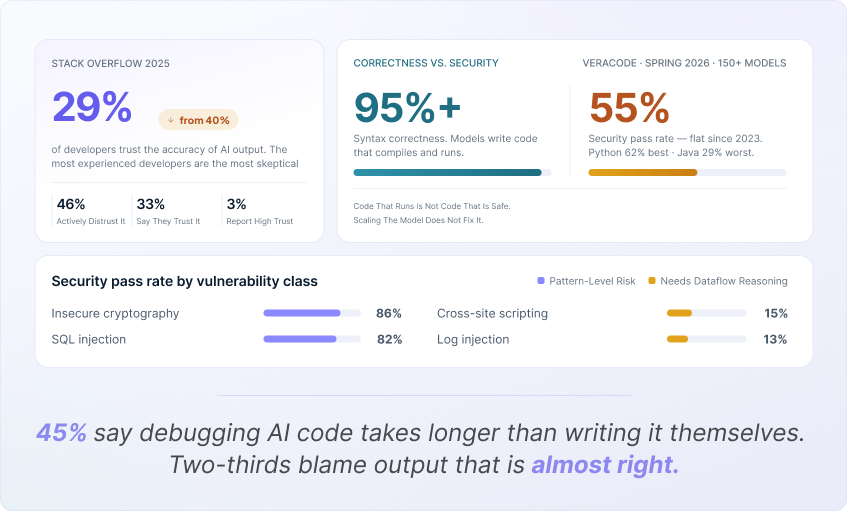
The Stack Overflow 2025 survey found only 29% of developers trust the accuracy of AI output, down from 40% the year before. More actively distrust it (46%) than trust it (33%), and just 3% report high trust. The most experienced developers are the most skeptical of all.
The reasons are specific rather than vague. Two-thirds of developers report the most common failure mode is output that is almost right, and 45% say debugging AI-generated code takes longer than writing it themselves. Nearly-correct code is more expensive than obviously wrong code, because obviously wrong code announces itself.
The Stack Overflow 2025 survey found only 29% of developers trust the accuracy of AI output, down from 40% the year before. More actively distrust it (46%) than trust it (33%), and just 3% report high trust. The most experienced developers are the most skeptical of all.
The reasons are specific rather than vague. Two-thirds of developers report the most common failure mode is output that is almost right, and 45% say debugging AI-generated code takes longer than writing it themselves. Nearly-correct code is more expensive than obviously wrong code, because obviously wrong code announces itself.
How Secure Is AI-Generated Code?
Less secure than it looks, and the gap has not closed.
Veracode has been running the same benchmark against AI models since 2023: 80 coding tasks, four languages, four common vulnerability classes, no security guidance in the prompt. Its Spring 2026 update tested the latest flagship models from every major vendor, bringing the total evaluated to more than 150.
The finding is stark. Syntax correctness has climbed past 95%. The security pass rate sits at roughly 55%, essentially where it was two years ago. Models have become excellent at writing code that runs and have not improved at writing code that is safe.
The detail matters for beginners:
- Python performed best at a 62% security pass rate. Java performed worst at 29%.
- Models handle obvious pattern-level risks well, passing 82% on SQL injection and 86% on insecure cryptography.
- They fail badly at anything requiring dataflow reasoning, passing just 15% on cross-site scripting and 13% on log injection.
Veracode's explanation is that models learn from frequency rather than correctness, and public code repositories are full of insecure patterns. Scaling the model does not fix it.
Treat every piece of AI-generated code as a draft written by a fast, confident developer who has never been told security matters.
Veracode has been running the same benchmark against AI models since 2023: 80 coding tasks, four languages, four common vulnerability classes, no security guidance in the prompt. Its Spring 2026 update tested the latest flagship models from every major vendor, bringing the total evaluated to more than 150.
The finding is stark. Syntax correctness has climbed past 95%. The security pass rate sits at roughly 55%, essentially where it was two years ago. Models have become excellent at writing code that runs and have not improved at writing code that is safe.
The detail matters for beginners:
- Python performed best at a 62% security pass rate. Java performed worst at 29%.
- Models handle obvious pattern-level risks well, passing 82% on SQL injection and 86% on insecure cryptography.
- They fail badly at anything requiring dataflow reasoning, passing just 15% on cross-site scripting and 13% on log injection.
Veracode's explanation is that models learn from frequency rather than correctness, and public code repositories are full of insecure patterns. Scaling the model does not fix it.
Treat every piece of AI-generated code as a draft written by a fast, confident developer who has never been told security matters.
What Happens When a Vibe-Coded Project Gets Too Big?
It gets slower to change, and then it stops changing.
The failure pattern is consistent. Early features arrive in minutes. Around the point where the project exceeds what fits in the model's working context, the agent starts rewriting things it should have left alone. Duplicate logic appears. Fixes in one place break something in another. You cannot diagnose it, because you never read the code.
Prevention is structural. Keep modules small. Maintain your AGENTS.md as the project grows. Refactor deliberately instead of letting the agent decide when to reorganize. Above all, keep reading the diffs, because the first sign of drift always shows up there before it shows up in the product.
The failure pattern is consistent. Early features arrive in minutes. Around the point where the project exceeds what fits in the model's working context, the agent starts rewriting things it should have left alone. Duplicate logic appears. Fixes in one place break something in another. You cannot diagnose it, because you never read the code.
Prevention is structural. Keep modules small. Maintain your AGENTS.md as the project grows. Refactor deliberately instead of letting the agent decide when to reorganize. Above all, keep reading the diffs, because the first sign of drift always shows up there before it shows up in the product.
What Is the Verification Gap?
The verification gap is the distance between code that appears correct and code that has been proven correct.
AI closed the generation half of software development and left the verification half untouched. You can now produce more code in a day than you can meaningfully review in a week.
Every practice in this guide, from the spec to the diff review to the tests, exists to close that gap. The tools got faster at producing. Your job is to get faster at verifying.
AI closed the generation half of software development and left the verification half untouched. You can now produce more code in a day than you can meaningfully review in a week.
Every practice in this guide, from the spec to the diff review to the tests, exists to close that gap. The tools got faster at producing. Your job is to get faster at verifying.
What Habits Separate Good Vibe Coders From Bad Ones?
Six behaviors, observable from the outside:
1. They write the spec first. Even a short one. Even for a small project.
2. They read every diff. Length is not an excuse.
3. They commit constantly. Working state is never more than one change away.
4. They ask for tests by default. Not as a separate task afterward.
5. They keep security-critical code out of scope. Auth, payments, and personal data go to established providers.
6. They maintain a learning list. Every concept they did not recognize goes on it, and the list gets worked through.
The people who fail do the opposite of all six, and the failure takes about three weeks to become obvious.
1. They write the spec first. Even a short one. Even for a small project.
2. They read every diff. Length is not an excuse.
3. They commit constantly. Working state is never more than one change away.
4. They ask for tests by default. Not as a separate task afterward.
5. They keep security-critical code out of scope. Auth, payments, and personal data go to established providers.
6. They maintain a learning list. Every concept they did not recognize goes on it, and the list gets worked through.
The people who fail do the opposite of all six, and the failure takes about three weeks to become obvious.
What Comes After Vibe Coding?
Agentic engineering, which is the same activity performed with discipline.
The practices are recognizable to anyone who has done software engineering: version control, automated testing, code review, documentation, observability, and a real understanding of the system you are responsible for. What changes is that agents do most of the typing and you do most of the deciding.
Karpathy's observation about this shift is worth sitting with. At the top of the field, technical mastery has become a larger multiplier than it was before, not a smaller one. A person who understands system architecture can direct a fleet of agents to remarkable output. A person who does not will generate broken code faster than they ever could by hand.
That is the honest case for learning to read code. Not because AI will stop writing it. Because the value of being able to judge what it wrote keeps going up.
The practices are recognizable to anyone who has done software engineering: version control, automated testing, code review, documentation, observability, and a real understanding of the system you are responsible for. What changes is that agents do most of the typing and you do most of the deciding.
Karpathy's observation about this shift is worth sitting with. At the top of the field, technical mastery has become a larger multiplier than it was before, not a smaller one. A person who understands system architecture can direct a fleet of agents to remarkable output. A person who does not will generate broken code faster than they ever could by hand.
That is the honest case for learning to read code. Not because AI will stop writing it. Because the value of being able to judge what it wrote keeps going up.
Frequently Asked Questions
1. Can you vibe code without knowing how to code?
Yes, for prototypes, internal tools, and personal projects. For anything handling real users, real money, or real data, you need either the ability to review the code or someone who can review it for you.
2. Is vibe coding worth learning in 2026?
Yes, as an entry point and as a working method. Google's DORA research puts daily AI use among technology professionals at 90%, and Gartner estimates the enterprise AI coding agent market at roughly ten billion dollars in annualized value. Learning the discipline around the tools is what separates useful adoption from expensive mistakes.
3. What is the best free vibe coding tool for beginners?
Google AI Studio is free for experimentation. Google Antigravity has been available in free public preview. Cursor, Claude Code, GitHub Copilot, Replit, and Bolt all offer free tiers sufficient to evaluate them, which makes it cheap to test the best vibe coding tools before committing to one.
4. Is there a free vibe coding course?
Yes. Google and Kaggle ran a free five-day AI Agents Intensive Vibe Coding Course in June 2026, and the materials are now available as a self-paced guide on Kaggle. You need a free Kaggle account and a free Google AI Studio account.
5. Why do developers distrust AI-generated code if they keep using it?
Because speed and reliability are separate properties. The Stack Overflow 2025 survey found trust at 29% while adoption kept climbing. Developers use the tools because they save time on the generation half of the job, and distrust the output because the verification half still falls to them.
6. How long does it take to build a working app with vibe coding?
A simple, well-scoped tool can go from description to working prototype in an hour or two. Getting that same tool to a state where it is secure, tested, and maintainable takes considerably longer, and that second phase is where most projects stall.
7. Does vibe coding replace developers?
No. It changes what developers spend time on. The evidence so far points toward AI amplifying the difference between skilled and unskilled practitioners rather than flattening it.

Written by / Author
Manasi Maheshwari
Found this useful? Share With
Top blogs
Most Read Blogs
Wits Innovation Lab is where creativity and innovation flourish. We provide the tools you need to come up with innovative solutions for today's businesses, big or small.
© 2026 Wits Innovation Lab, All rights reserved
Crafted in-house by WIL’s talented minds