

Published - 2 days ago | 14 min read
How to Build AI Agents for Business Automation: The Complete 2026 Guide
Through 2024 and much of 2025, AI agents were largely confined to pilots and proofs of concept. Most organizations recognized the potential, but few had moved agents into core operations at scale.
In 2026, that has begun to shift. A growing number of companies now run AI agents for business automation in production, and the early results are measurable:
- Stripe's in-house coding agents, called Minions, are behind more than 1,000 merged pull requests each week. Engineers review the code. The agents write it from start to finish.
- TELUS, the Canadian telecom company, reports more than 500,000 hours saved, with 57,000 team members using generative AI and over 13,000 custom AI solutions built by staff.
- Gartner predicts that 40% of enterprise apps will include task-specific AI agents by the end of 2026. In 2025 it was less than 5%.
Gartner also adds a warning. It predicts that over 40% of agentic AI projects will be canceled by the end of 2027, because of rising costs, unclear value or weak risk controls.
So agents work. And lots of agent projects will still fail. This guide is about landing on the right side of that line. It covers:
- what an AI agent is and how it works
- agentic AI vs traditional automation, and how to tell which one a job needs
- what the companies getting results are doing differently
- real use cases by department
- an 8-step framework to build your first agent, with one example followed from start to finish
- the tools to build with, from no-code to developer kits
In 2026, that has begun to shift. A growing number of companies now run AI agents for business automation in production, and the early results are measurable:
- Stripe's in-house coding agents, called Minions, are behind more than 1,000 merged pull requests each week. Engineers review the code. The agents write it from start to finish.
- TELUS, the Canadian telecom company, reports more than 500,000 hours saved, with 57,000 team members using generative AI and over 13,000 custom AI solutions built by staff.
- Gartner predicts that 40% of enterprise apps will include task-specific AI agents by the end of 2026. In 2025 it was less than 5%.
Gartner also adds a warning. It predicts that over 40% of agentic AI projects will be canceled by the end of 2027, because of rising costs, unclear value or weak risk controls.
So agents work. And lots of agent projects will still fail. This guide is about landing on the right side of that line. It covers:
- what an AI agent is and how it works
- agentic AI vs traditional automation, and how to tell which one a job needs
- what the companies getting results are doing differently
- real use cases by department
- an 8-step framework to build your first agent, with one example followed from start to finish
- the tools to build with, from no-code to developer kits
AI Agents for Business Automation: The Short Version
Short on time? These are the points that matter.
- Agents are in production now. Stripe, TELUS and others run them on everyday work, with people reviewing the output.
- Most companies are still early. In McKinsey's 2025 survey, 23% of organizations were scaling an AI agent somewhere. In any single department, no more than 10% were.
- You don't always need an agent. If you can draw the process as a fixed flowchart, regular automation is cheaper and more predictable. Agents earn their keep when the input is messy and the next step depends on what they find.
- The winners redesign the work. McKinsey's top performers were nearly three times as likely to have rebuilt their workflows from scratch.
- Start narrow. One job, a clear finish line, a person approving anything that can't be undone.
- Measure before you build. If you don't know how long the job takes today, you won't know if the agent is worth paying for.
- Agents are in production now. Stripe, TELUS and others run them on everyday work, with people reviewing the output.
- Most companies are still early. In McKinsey's 2025 survey, 23% of organizations were scaling an AI agent somewhere. In any single department, no more than 10% were.
- You don't always need an agent. If you can draw the process as a fixed flowchart, regular automation is cheaper and more predictable. Agents earn their keep when the input is messy and the next step depends on what they find.
- The winners redesign the work. McKinsey's top performers were nearly three times as likely to have rebuilt their workflows from scratch.
- Start narrow. One job, a clear finish line, a person approving anything that can't be undone.
- Measure before you build. If you don't know how long the job takes today, you won't know if the agent is worth paying for.
AI Agents for Business Automation: The Short Version
AI agents for business automation are software systems that take a goal, work out the steps, use your business tools to carry them out and check the result before handing it on. Regular automation follows a script you wrote. An agent makes its own plan, inside limits you set.
A simple example. You tell a regular automation: "When a form comes in, add a row to the spreadsheet." It does exactly that, every time.
You tell an agent: "Qualify this new lead." It reads the message, looks up the company's website, checks your CRM for past contact, compares the lead to your ideal customer, writes a note and decides who should follow up. Nobody told it the order. It figured that out.
Anthropic, which makes the Claude models, draws the line clearly in its guide to building effective agents. Workflows run "through predefined code paths." Agents "dynamically direct their own processes and tool usage."
A simple example. You tell a regular automation: "When a form comes in, add a row to the spreadsheet." It does exactly that, every time.
You tell an agent: "Qualify this new lead." It reads the message, looks up the company's website, checks your CRM for past contact, compares the lead to your ideal customer, writes a note and decides who should follow up. Nobody told it the order. It figured that out.
Anthropic, which makes the Claude models, draws the line clearly in its guide to building effective agents. Workflows run "through predefined code paths." Agents "dynamically direct their own processes and tool usage."
The four parts of every AI agent
Strip away the branding and every agent has the same four parts:
1. A model. The AI that reads, reasons and writes, such as GPT, Claude or Gemini.
2. Instructions and knowledge. What the job is, what good looks like, your rules, your prices, your policies.
3. Tools. The actions it's allowed to take: search the web, read an inbox, update a CRM record, create a ticket, send a Slack message.
4. Guardrails. Limits on what it can touch, when it has to stop, and when it must ask a person.
Most failed agent projects get the model right and skimp on the other three.
1. A model. The AI that reads, reasons and writes, such as GPT, Claude or Gemini.
2. Instructions and knowledge. What the job is, what good looks like, your rules, your prices, your policies.
3. Tools. The actions it's allowed to take: search the web, read an inbox, update a CRM record, create a ticket, send a Slack message.
4. Guardrails. Limits on what it can touch, when it has to stop, and when it must ask a person.
Most failed agent projects get the model right and skimp on the other three.
Agentic AI vs Traditional Automation: Which Does the Job Need?
The short answer: traditional automation is for jobs you can draw as a flowchart. Agentic AI is for jobs where the next step depends on what you find along the way.
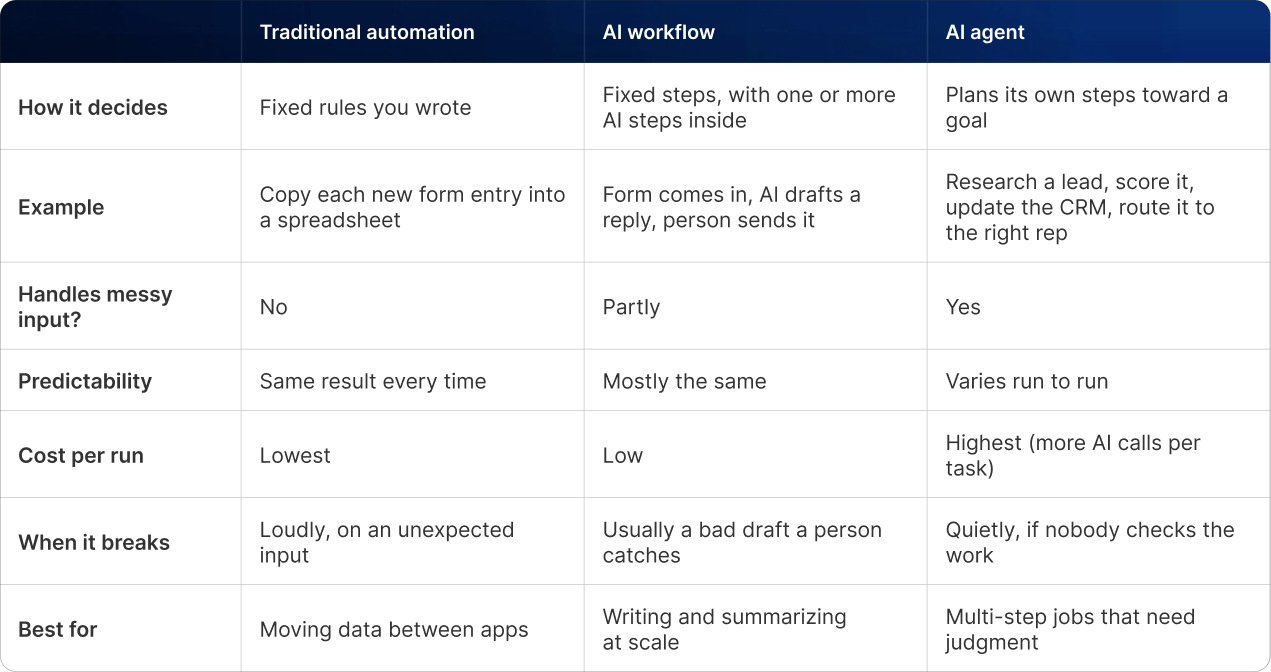
Think of it as a ladder. Most businesses should climb it one rung at a time. Our beginner's guide to AI automation for small business covers the first two rungs. This guide is about the third.
Gartner's advice sums it up well: use AI agents for decisions, automation for routine workflows and assistants for simple retrieval.
Gartner's advice sums it up well: use AI agents for decisions, automation for routine workflows and assistants for simple retrieval.
A quick test: do you need an agent?
Ask three questions about the job:
1. Does the input arrive in different shapes? Free-text emails, PDFs, calls and chats, rather than a tidy form.
2. Does the path change case by case? Some leads need research, some need a reply, some need nothing.
3. Can you check the result easily? A person can glance at the output and tell if it's right.
Three yeses: an agent is a good fit. A no on the first two: use regular automation, it's cheaper. A no on the third: don't automate it yet.
1. Does the input arrive in different shapes? Free-text emails, PDFs, calls and chats, rather than a tidy form.
2. Does the path change case by case? Some leads need research, some need a reply, some need nothing.
3. Can you check the result easily? A person can glance at the output and tell if it's right.
Three yeses: an agent is a good fit. A no on the first two: use regular automation, it's cheaper. A no on the third: don't automate it yet.
What Changed in 2026: AI Agents for Business Automation in Production
Three things moved agents from demo to daily work: models got better at using tools, vendors built agents into the software companies already pay for, and early adopters published real numbers. Here's what those numbers say.
Stripe: 1,000+ merged pull requests a week
Stripe's engineering blog describes Minions as the company's "homegrown coding agents, responsible for more than a thousand pull requests merged each week." The key line is the next one: "Though humans review the code, minions write it from start to finish."
What to take from it: Stripe didn't remove the review step. It moved people from writing to checking. That's the pattern to copy.
What to take from it: Stripe didn't remove the review step. It moved people from writing to checking. That's the pattern to copy.
TELUS: 500,000+ hours saved
TELUS rolled AI out to the whole company and let staff build their own tools. According to its customer story, the results so far are:
- 500,000+ hours saved, at about 40 minutes per AI interaction
- 57,000 team members actively using generative AI
- 13,000+ custom AI solutions built by employees
- engineering teams shipping code 30% faster
- 47 large-scale solutions that have driven over $90 million in benefits
(These are company-reported figures from a vendor case study.)
What to take from it: The hours came from thousands of small, specific tools built by the people who do the work. No single "AI transformation" project produced them.
- 500,000+ hours saved, at about 40 minutes per AI interaction
- 57,000 team members actively using generative AI
- 13,000+ custom AI solutions built by employees
- engineering teams shipping code 30% faster
- 47 large-scale solutions that have driven over $90 million in benefits
(These are company-reported figures from a vendor case study.)
What to take from it: The hours came from thousands of small, specific tools built by the people who do the work. No single "AI transformation" project produced them.
Gartner: 40% of enterprise apps by the end of 2026
In August 2025, Gartner predicted that 40% of enterprise applications will be integrated with task-specific AI agents by the end of 2026, up from less than 5% in 2025. In practice, that means the CRM, helpdesk and accounting tools you already use are adding agents whether you build one or not.
The reality check
The wider picture is more mixed:
- In McKinsey's State of AI 2025 survey of 1,993 people, 23% said their organization is scaling an agentic AI system and another 39% are experimenting. No more than 10% were scaling agents in any one business function.
- The companies getting the most value were nearly three times as likely to have fundamentally redesigned their workflows.
- Gartner expects over 40% of agentic AI projects to be canceled by the end of 2027. It also warns about "agent washing": vendors relabeling chatbots and old automation as agents. Of the thousands of vendors claiming agentic AI, Gartner estimates only about 130 are the real thing.
The lesson is consistent across every source. Agents pay off when a company picks a specific job, rebuilds how that job is done and keeps a person checking the output.
- In McKinsey's State of AI 2025 survey of 1,993 people, 23% said their organization is scaling an agentic AI system and another 39% are experimenting. No more than 10% were scaling agents in any one business function.
- The companies getting the most value were nearly three times as likely to have fundamentally redesigned their workflows.
- Gartner expects over 40% of agentic AI projects to be canceled by the end of 2027. It also warns about "agent washing": vendors relabeling chatbots and old automation as agents. Of the thousands of vendors claiming agentic AI, Gartner estimates only about 130 are the real thing.
The lesson is consistent across every source. Agents pay off when a company picks a specific job, rebuilds how that job is done and keeps a person checking the output.
Real Use Cases for AI Agents in Business Automation
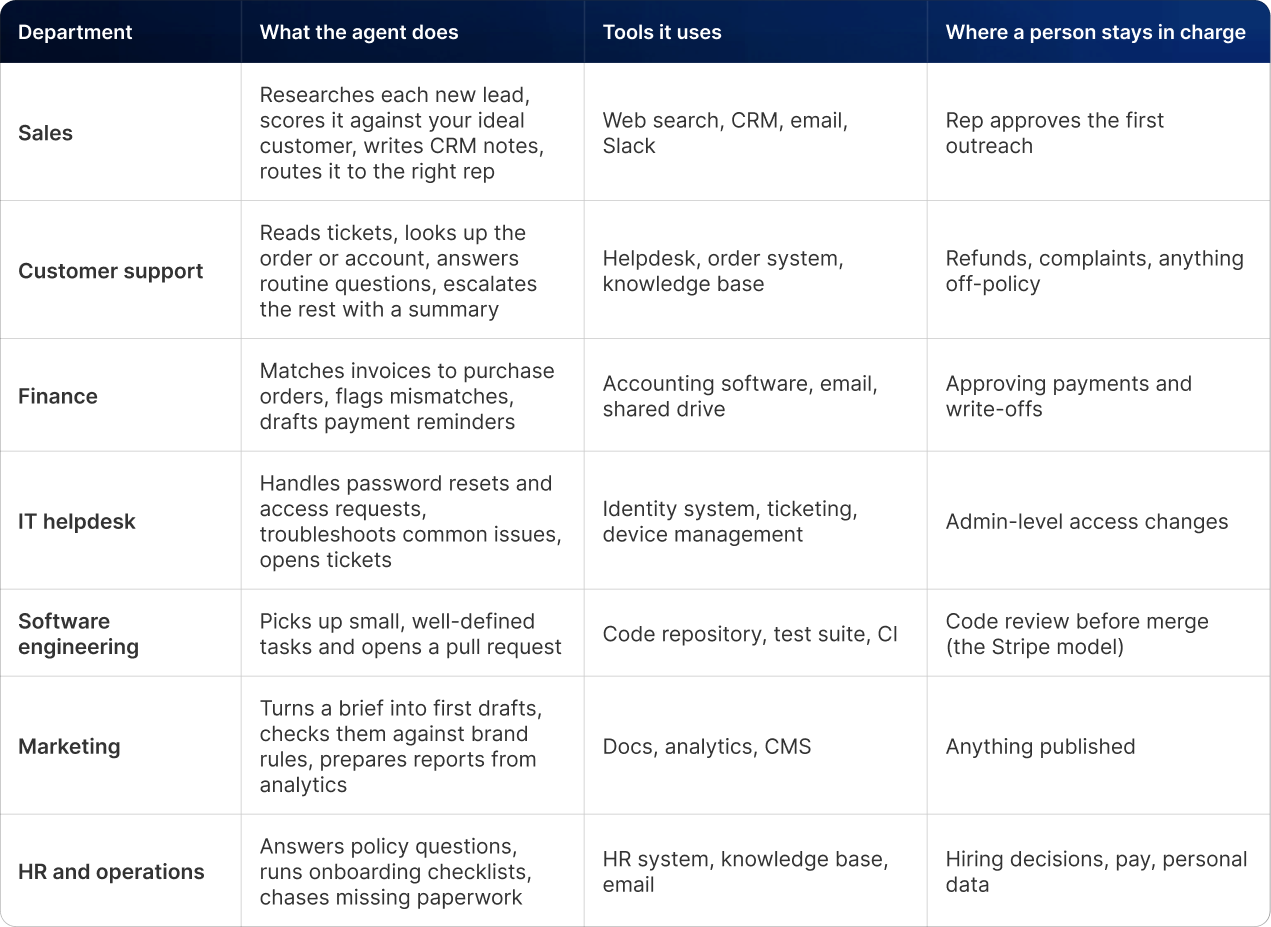
The best first agents share one trait. They take a job that's mostly gathering, sorting and drafting, and leave the final call to a person. McKinsey found agent use is most common in IT and knowledge management, so those are safe places to start. Here's what that looks like by department.
How to Build AI Agents for Business Automation: An 8-Step Framework
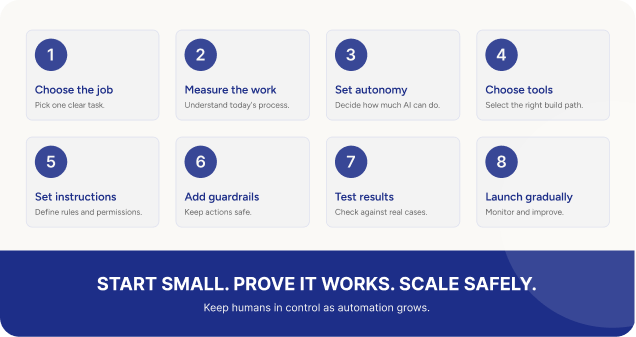
This framework takes you from "we should try agents" to one agent running safely in production. We'll follow one example the whole way through.
Step 1: Pick one job with a clear finish line
Good first jobs are frequent, multi-step and easy to check. Bad first jobs are rare, high-stakes or hard to judge.
Write the job as one sentence with a finish line: "For every new inbound lead, research the company, score the fit, log it in the CRM and alert the right person within 15 minutes."
If you can't write that sentence, the job isn't ready for an agent.
Write the job as one sentence with a finish line: "For every new inbound lead, research the company, score the fit, log it in the CRM and alert the right person within 15 minutes."
If you can't write that sentence, the job isn't ready for an agent.
Step 2: Map how the job is done today, and measure it
Sit with the person who does the job and write down every step, every tool they open and every judgment call they make. Then record two baseline numbers:
- time per task (here: 10 minutes per lead)
- outcome quality (here: median reply time of about 20 hours, and how many good leads slip through)
This is where most teams find that half the steps don't need AI at all. Logging the lead in the CRM is a fixed step. Deciding if it's a fit is the judgment call. Only the judgment needs the agent.
- time per task (here: 10 minutes per lead)
- outcome quality (here: median reply time of about 20 hours, and how many good leads slip through)
This is where most teams find that half the steps don't need AI at all. Logging the lead in the CRM is a fixed step. Deciding if it's a fit is the judgment call. Only the judgment needs the agent.
Step 3: Decide how much freedom the agent gets
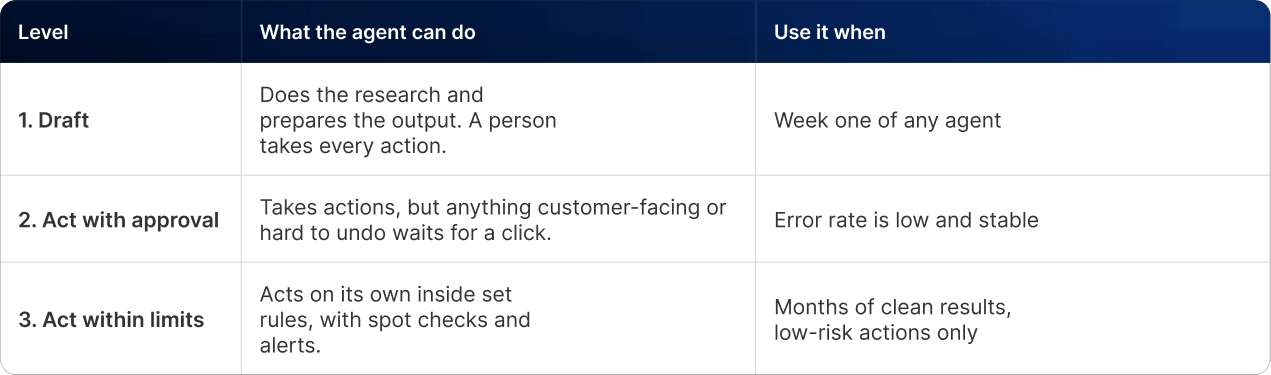
Use three levels, and start every agent at Level 1:
In the example, the agent starts at Level 1: it researches and scores, but the account manager approves every CRM update and alert.
Step 4: Choose your build path
You have three options, covered in detail in the tools section below:
- Agent features in tools you already use.Fastest, least flexible.
- No-code agent builders like Zapier Agents or n8n. A good fit for most small and mid-sized teams.
- Developer frameworks, like the OpenAI Agents SDK, Claude Agent SDK or LangGraph. Most control, needs engineers.
The agency picks a no-code builder because its CRM, inbox and Slack all connect out of the box.
- Agent features in tools you already use.Fastest, least flexible.
- No-code agent builders like Zapier Agents or n8n. A good fit for most small and mid-sized teams.
- Developer frameworks, like the OpenAI Agents SDK, Claude Agent SDK or LangGraph. Most control, needs engineers.
The agency picks a no-code builder because its CRM, inbox and Slack all connect out of the box.
Step 5: Write the instructions and connect the tools
The instructions are a job description. Write them as if you were briefing a smart new hire on day one. Include:
- the goal and the finish line from Step 1
- your ideal customer profile, with real examples of good and bad fits
- the scoring rules (for example: company size, industry, budget signals, location)
- what to write in the CRM note, with one example of a great note
- what to do when it's unsure: stop and flag it, never guess
Then connect only the tools the job needs. The lead agent needs web search, read and write access to the lead record in the CRM, and the ability to post in one Slack channel. It doesn't need your billing system, your whole inbox or the power to delete records.
Anthropic's agent guide makes the same point about tools: describe each one clearly, because the agent relies on that description to use it well.
- the goal and the finish line from Step 1
- your ideal customer profile, with real examples of good and bad fits
- the scoring rules (for example: company size, industry, budget signals, location)
- what to write in the CRM note, with one example of a great note
- what to do when it's unsure: stop and flag it, never guess
Then connect only the tools the job needs. The lead agent needs web search, read and write access to the lead record in the CRM, and the ability to post in one Slack channel. It doesn't need your billing system, your whole inbox or the power to delete records.
Anthropic's agent guide makes the same point about tools: describe each one clearly, because the agent relies on that description to use it well.
Step 6: Add guardrails before you switch it on
Guardrails are the difference between an agent you trust and one you babysit. At minimum:
- A step limit. Stop after a set number of actions, so it can't loop forever and run up costs.
- Approval gates. Anything that sends, pays, deletes or changes a customer record waits for a person.
- An escape hatch. If the input mentions a complaint, legal issue or anything sensitive, hand it to a person straight away.
- A full log. Every action, every tool call, every decision, saved where someone can review it.
- A spending cap. Set a monthly budget alert with your AI provider or platform.
- A step limit. Stop after a set number of actions, so it can't loop forever and run up costs.
- Approval gates. Anything that sends, pays, deletes or changes a customer record waits for a person.
- An escape hatch. If the input mentions a complaint, legal issue or anything sensitive, hand it to a person straight away.
- A full log. Every action, every tool call, every decision, saved where someone can review it.
- A spending cap. Set a monthly budget alert with your AI provider or platform.
Step 7: Test on real past cases before going live
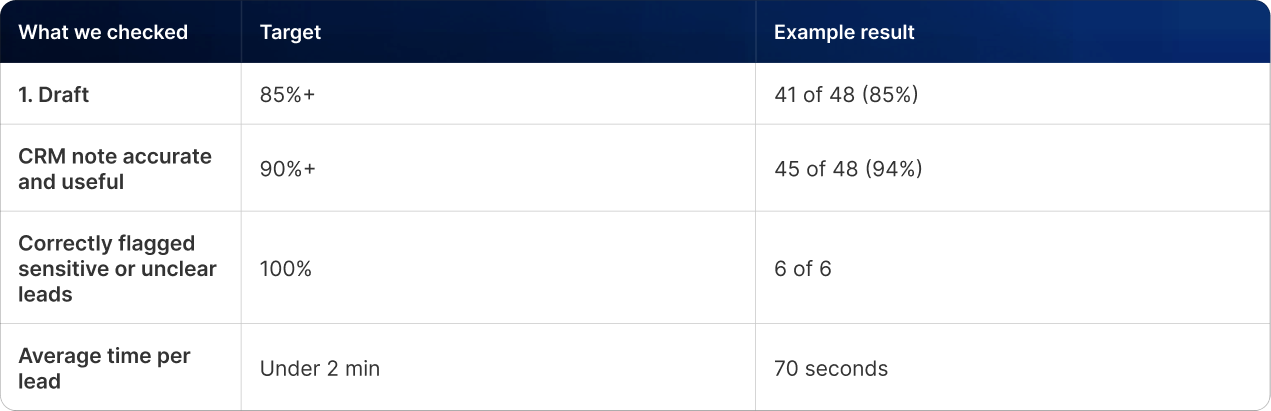
Pull 30 to 50 real leads from the last few months where you already know the right answer. Run the agent on all of them in a test setup and score each result:
For every miss, ask why. Most errors trace back to a gap in the instructions, like a missing rule about agencies that resell services. Fix the instructions, then rerun the full test set.
Step 8: Launch in stages and give it an owner
1. Shadow mode (week 1 to 2). The agent runs on live leads, but nobody acts on its output. Compare its calls with the account manager's.
2. Supervised (week 3 to 6). The agent's work goes live after a person approves it. Track how often they change something.
3. Limited autonomy (after that). Low-risk actions, like logging and internal alerts, run on their own. Customer-facing messages still get approved.
2. Supervised (week 3 to 6). The agent's work goes live after a person approves it. Track how often they change something.
3. Limited autonomy (after that). Low-risk actions, like logging and internal alerts, run on their own. Customer-facing messages still get approved.
Then name one owner. They review a sample of the agent's work every week, watch the costs and update the instructions when the business changes. An agent with no owner drifts.
For the agency, the account manager's 10 hours a week of research becomes about one hour of review, and new leads get a response in minutes instead of the next day. That's the kind of narrow, measurable win that funds the next agent.
For the agency, the account manager's 10 hours a week of research becomes about one hour of review, and new leads get a response in minutes instead of the next day. That's the kind of narrow, measurable win that funds the next agent.
What the finished agent looks like
Here's the lead agent from the example, with the guardrails in place:
[embed: node/5721d2e5-efae]
The agent only touches read-only tools. Sensitive or unclear leads go straight to a person, and nothing reaches the CRM or the sales team until someone approves it.
[embed: node/5721d2e5-efae]
The agent only touches read-only tools. Sensitive or unclear leads go straight to a person, and nothing reaches the CRM or the sales team until someone approves it.
Best Tools to Build AI Agents in 2026
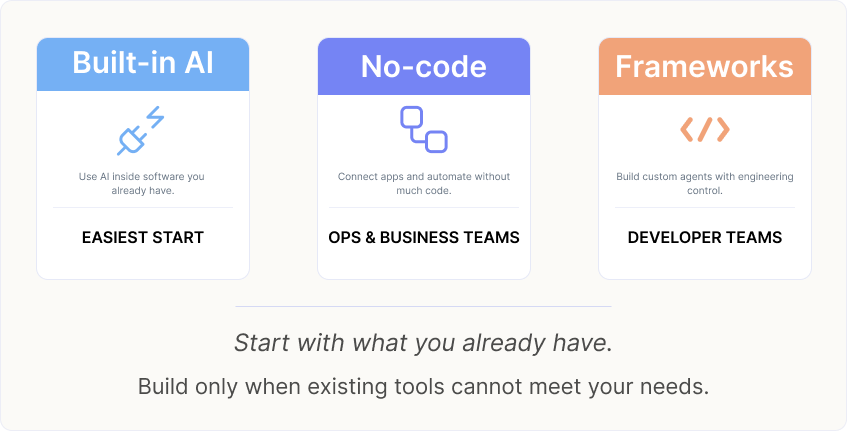
Pick the tool that matches who will maintain the agent. A developer framework is wasted if nobody on staff can code, and a no-code builder will frustrate an engineering team that needs fine control.
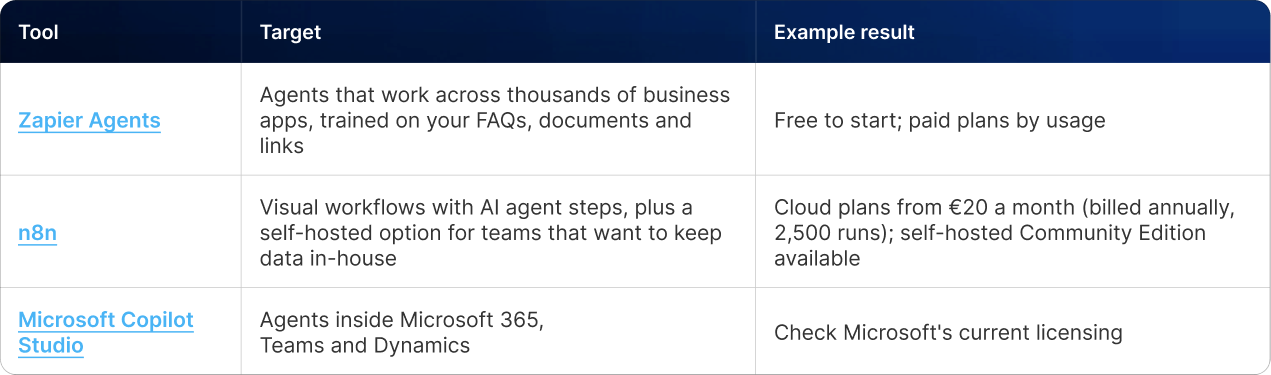
No-code and low-code agent builders
Best for operations, sales and marketing teams without developers.
Developer frameworks
Best when you have engineers and need custom logic, tighter security or high volume.

The frameworks themselves are free. You pay for the AI model usage, which depends on how many tasks the agent runs and how many steps each one takes. Set a budget alert on day one.
The frameworks themselves are free. You pay for the AI model usage, which depends on how many tasks the agent runs and how many steps each one takes. Set a budget alert on day one.
The frameworks themselves are free. You pay for the AI model usage, which depends on how many tasks the agent runs and how many steps each one takes. Set a budget alert on day one.
Agents already inside your software
The frameworks themselves are free. You pay for the AI model usage, which depends on how many tasks the agent runs and how many steps each one takes. Set a budget alert on day one.
The frameworks themselves are free. You pay for the AI model usage, which depends on how many tasks the agent runs and how many steps each one takes. Set a budget alert on day one.
The frameworks themselves are free. You pay for the AI model usage, which depends on how many tasks the agent runs and how many steps each one takes. Set a budget alert on day one.
Common Mistakes When Building AI Agents
Gartner's three reasons for canceled projects (rising costs, unclear value, weak risk controls) show up in the same handful of mistakes.
1. Using an agent where a workflow would do. If the steps never change, an agent just adds cost and unpredictability. Run the three-question test first.
2. Buying "agents" that aren't. Ask any vendor to show the agent choosing between different paths on a messy, real example. If it only follows a script, it's automation with a new label.
3. Bolting an agent onto a broken process. McKinsey's top performers redesigned the workflow first. An agent running a messy process just makes the mess faster.
4. Giving it too much access. Every tool and permission is something that can go wrong. Start with read-only access wherever you can.
5. No stop conditions. Without a step limit and a budget alert, one confused agent can loop for hours and run up a real bill.
6. Skipping the test set. Trying it on three examples and calling it ready is how bad outputs reach customers. Test on 30 to 50 real past cases.
7. No owner after launch. Your prices, policies and products change. An agent nobody maintains keeps working from last quarter's rules.
1. Using an agent where a workflow would do. If the steps never change, an agent just adds cost and unpredictability. Run the three-question test first.
2. Buying "agents" that aren't. Ask any vendor to show the agent choosing between different paths on a messy, real example. If it only follows a script, it's automation with a new label.
3. Bolting an agent onto a broken process. McKinsey's top performers redesigned the workflow first. An agent running a messy process just makes the mess faster.
4. Giving it too much access. Every tool and permission is something that can go wrong. Start with read-only access wherever you can.
5. No stop conditions. Without a step limit and a budget alert, one confused agent can loop for hours and run up a real bill.
6. Skipping the test set. Trying it on three examples and calling it ready is how bad outputs reach customers. Test on 30 to 50 real past cases.
7. No owner after launch. Your prices, policies and products change. An agent nobody maintains keeps working from last quarter's rules.
Getting Started with AI Agents for Business Automation
The companies seeing results in 2026 didn't start with a grand AI strategy. Stripe pointed agents at coding work and kept engineers reviewing every pull request. TELUS let staff build thousands of small tools for their own jobs. They picked specific work, kept a person checking it and grew from there.
You can start the same way this week:
1. List five jobs your team does every week that involve gathering information and making a call.
2. Run each through the three-question test.
3. Pick the one with the clearest finish line, and time it for a week.
By the end of next month, you could have your first agent in shadow mode, doing the research while your team does the deciding.
You can start the same way this week:
1. List five jobs your team does every week that involve gathering information and making a call.
2. Run each through the three-question test.
3. Pick the one with the clearest finish line, and time it for a week.
By the end of next month, you could have your first agent in shadow mode, doing the research while your team does the deciding.
Want help picking your first agent?
Book a free 30-minute agent readiness review with our team. We'll look at your shortlist, tell you which job is ready for an agent and which ones regular automation handles better, and map out the tools that fit your stack. You'll leave with a clear plan, whether or not you work with us.
Book your free agent readiness review →
Book your free agent readiness review →
Frequently Asked Questions About AI Agents for Business Automation
1. What is the difference between agentic AI and traditional automation?
Traditional automation follows fixed rules you write, so it does the same thing every time. Agentic AI is given a goal and works out its own steps, choosing which tools to use based on what it finds. Use traditional automation for predictable, repeatable tasks. Use agents for multi-step jobs with messy inputs that need judgment.
2. How much does it cost to build an AI agent for a business?
A simple agent built on a no-code platform can start free or for a few hundred dollars a year in platform fees, plus AI usage. Custom agents built by developers cost more in engineering time. In both cases, ongoing cost depends on volume, so set a budget alert and track cost per completed task.
3. Do I need developers to build an AI agent?
No. No-code builders like Zapier Agents and n8n let operations and marketing teams build agents by connecting apps and writing instructions in everyday language. You'll want developers when the agent needs custom integrations, strict security controls or very high volume. The hardest part is usually writing clear instructions, which needs no coding.
4. Are AI agents safe to connect to business systems?
They can be, with the right guardrails. Give the agent only the access the job needs, require human approval for anything that sends, pays or deletes, set step and spending limits, and log every action. Start in shadow mode, where the agent's output isn't used, until you trust its results.
5. What is the best first AI agent for a business?
Pick a frequent, multi-step job where mistakes are easy to spot and undo. Lead research and qualification, support ticket triage, invoice matching and IT helpdesk requests are common first choices. Each one involves gathering information and making a recommendation, while a person still makes the final call.
6. How long does it take to build and launch an AI agent?
A focused agent on a no-code platform can be built in a few days. Testing on past cases takes about a week, and a staged launch through shadow mode and supervised use takes another four to six weeks. Most teams have one agent running reliably within two months.

Written by / Author
Manasi Maheshwari
Found this useful? Share With
Top blogs
Most Read Blogs
Wits Innovation Lab is where creativity and innovation flourish. We provide the tools you need to come up with innovative solutions for today's businesses, big or small.
© 2026 Wits Innovation Lab, All rights reserved
Crafted in-house by WIL’s talented minds