

Understanding Cloud-Native SaaS Backends
A cloud-native SaaS backend on GCP refers to backend infrastructure built specifically for cloud environments using containerized services, orchestration platforms, and managed cloud services. Building a cloud-native SaaS backend on GCP means your application scales automatically, recovers from failures without manual intervention, and leverages Google's infrastructure for reliability.
The shift from monolithic to cloud-native matters because traditional backends struggle with modern demands. When traffic spikes 10x during a product launch, monolithic systems crash or slow to a crawl. Cloud-native backends scale individual components independently, handling surges without breaking.
Three characteristics define cloud-native architecture. First, services run in containers that package code with dependencies, ensuring consistency across environments. Second, orchestration platforms like GKE manage container lifecycles automatically. Third, backends use managed services for databases, messaging, and storage instead of maintaining infrastructure.
The shift from monolithic to cloud-native matters because traditional backends struggle with modern demands. When traffic spikes 10x during a product launch, monolithic systems crash or slow to a crawl. Cloud-native backends scale individual components independently, handling surges without breaking.
Three characteristics define cloud-native architecture. First, services run in containers that package code with dependencies, ensuring consistency across environments. Second, orchestration platforms like GKE manage container lifecycles automatically. Third, backends use managed services for databases, messaging, and storage instead of maintaining infrastructure.
Why GCP for Cloud-Native Architecture
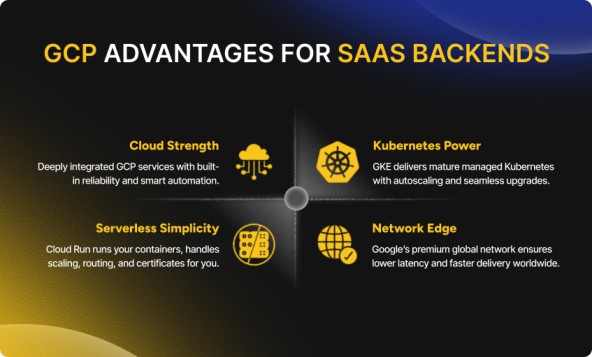
GCP offers specific advantages when building a cloud-native SaaS backend compared to other cloud providers. The integration between services runs deeper than simple API connections. When you deploy a container to GKE, load balancing, health checks, and logging are configured automatically through native integrations.
Google Kubernetes Engine represents the most mature managed Kubernetes offering available. Google created Kubernetes, and that heritage shows in features other platforms lack. GKE clusters can be upgraded without downtime, autoscale based on actual workload metrics, and integrate with Cloud Operations for observability without installing agents.
Cloud Run provides serverless container execution when full Kubernetes feels excessive. You deploy a container, and GCP handles everything else, scaling to zero during idle periods, scaling to thousands of instances under load, managing HTTPS certificates, and routing traffic. The pricing model charges only for actual request processing time.
Regional infrastructure and network performance matter more than marketing materials suggest. GCP's Premium Tier networking routes traffic across Google's private fiber network rather than the public internet. For a SaaS backend serving global customers, this translates to 20-30% lower latency in practice.
Google Kubernetes Engine represents the most mature managed Kubernetes offering available. Google created Kubernetes, and that heritage shows in features other platforms lack. GKE clusters can be upgraded without downtime, autoscale based on actual workload metrics, and integrate with Cloud Operations for observability without installing agents.
Cloud Run provides serverless container execution when full Kubernetes feels excessive. You deploy a container, and GCP handles everything else, scaling to zero during idle periods, scaling to thousands of instances under load, managing HTTPS certificates, and routing traffic. The pricing model charges only for actual request processing time.
Regional infrastructure and network performance matter more than marketing materials suggest. GCP's Premium Tier networking routes traffic across Google's private fiber network rather than the public internet. For a SaaS backend serving global customers, this translates to 20-30% lower latency in practice.
1. Designing Microservices for SaaS
Microservices architecture forms the foundation when you build a cloud-native SaaS backend on GCP. Each service owns a specific business capability, user authentication, payment processing, notification delivery, and operates independently. This separation allows teams to deploy services without coordinating releases across the entire platform.
Identifying Service Boundaries
Start by identifying bounded contexts in your application. A billing service handles payment processing, subscription management, and invoice generation. An authentication service manages user credentials, sessions, and permissions. A notification service sends emails, push notifications, and SMS. Each service maintains its own database and communicates through APIs or message queues.
Service boundaries should align with team structure and deployment frequency. If your billing team deploys three times daily while notifications deploy weekly, separating these services prevents deployment bottlenecks. Conway's Law proves true, your architecture will mirror your organization, whether you plan for it or not.
Start by identifying bounded contexts in your application. A billing service handles payment processing, subscription management, and invoice generation. An authentication service manages user credentials, sessions, and permissions. A notification service sends emails, push notifications, and SMS. Each service maintains its own database and communicates through APIs or message queues.
Service boundaries should align with team structure and deployment frequency. If your billing team deploys three times daily while notifications deploy weekly, separating these services prevents deployment bottlenecks. Conway's Law proves true, your architecture will mirror your organization, whether you plan for it or not.
Communication Patterns Between Services
Communication patterns between services require deliberate design. Synchronous REST APIs work for operations requiring immediate responses. When a user updates their profile, the API gateway calls the user service synchronously and returns the result. Asynchronous messaging via Pub/Sub handles operations that don't require immediate responses. When a payment succeeds, the billing service publishes an event that the notification service consumes to send a receipt email.
Communication patterns between services require deliberate design. Synchronous REST APIs work for operations requiring immediate responses. When a user updates their profile, the API gateway calls the user service synchronously and returns the result. Asynchronous messaging via Pub/Sub handles operations that don't require immediate responses. When a payment succeeds, the billing service publishes an event that the notification service consumes to send a receipt email.
Database Strategy for Microservices
Database strategy differs from monolithic approaches. Each microservice owns its database schema. The billing service writes to a Cloud SQL PostgreSQL instance. The notification service uses Firestore for storing template configurations. The authentication service maintains user credentials in a separate database with enhanced security controls. This separation allows services to choose appropriate database technologies and evolve schemas independently.
Database strategy differs from monolithic approaches. Each microservice owns its database schema. The billing service writes to a Cloud SQL PostgreSQL instance. The notification service uses Firestore for storing template configurations. The authentication service maintains user credentials in a separate database with enhanced security controls. This separation allows services to choose appropriate database technologies and evolve schemas independently.
2. Container Strategy with Docker
Containerization packages your microservices for deployment when you build a cloud-native SaaS backend on GCP. Docker containers bundle application code, runtime, libraries, and dependencies into a single executable unit that runs consistently across development, staging, and production environments.
Writing Optimized Dockerfiles
Writing effective Dockerfiles requires understanding layer caching and image size optimization. Start with slim base images like python:3.11-slim or node:18-alpine rather than full operating system images. The smaller your base image, the faster your containers start and the less storage you consume.
Multi-stage builds separate build dependencies from runtime dependencies. Your application might need compilation tools during the build process, but not in the final container. A multi-stage Dockerfile compiles code in one stage using a full development image, then copies only the compiled artifacts into a slim runtime image.
Writing effective Dockerfiles requires understanding layer caching and image size optimization. Start with slim base images like python:3.11-slim or node:18-alpine rather than full operating system images. The smaller your base image, the faster your containers start and the less storage you consume.
Multi-stage builds separate build dependencies from runtime dependencies. Your application might need compilation tools during the build process, but not in the final container. A multi-stage Dockerfile compiles code in one stage using a full development image, then copies only the compiled artifacts into a slim runtime image.
Container Security Practices
Security practices matter from the first container you build. Never run containers as root. Create a dedicated user with minimal permissions for running your application. Scan images for vulnerabilities using Artifact Registry's built-in scanning. Update base images regularly as security patches are released.
Managing secrets requires special attention. Never embed API keys, database passwords, or certificates in container images. Use Secret Manager to store sensitive values and mount them as environment variables at runtime. GKE and Cloud Run both integrate with Secret Manager for automatic secret injection.
Security practices matter from the first container you build. Never run containers as root. Create a dedicated user with minimal permissions for running your application. Scan images for vulnerabilities using Artifact Registry's built-in scanning. Update base images regularly as security patches are released.
Managing secrets requires special attention. Never embed API keys, database passwords, or certificates in container images. Use Secret Manager to store sensitive values and mount them as environment variables at runtime. GKE and Cloud Run both integrate with Secret Manager for automatic secret injection.
Using Artifact Registry
Container registries store your images for deployment. Artifact Registry replaced Container Registry as GCP's recommended solution. Artifact Registry provides vulnerability scanning, access controls through IAM, and regional replication for faster image pulls across multiple regions.
Container registries store your images for deployment. Artifact Registry replaced Container Registry as GCP's recommended solution. Artifact Registry provides vulnerability scanning, access controls through IAM, and regional replication for faster image pulls across multiple regions.
3. Kubernetes Engine Setup
Google Kubernetes Engine orchestrates containers at scale when you build a cloud-native SaaS backend on GCP. GKE manages cluster operations, node provisioning, upgrades, scaling, and health monitoring, while you focus on deploying applications.
Choosing Cluster Configuration
Cluster configuration starts with choosing between Standard and Autopilot modes. Standard mode gives full control over node configuration, machine types, and networking. Autopilot mode manages infrastructure automatically, choosing appropriate machine types and scaling nodes based on workload requirements. For most SaaS backends, Autopilot reduces operational burden without sacrificing capabilities.
Regional clusters distribute nodes across multiple zones within a region for high availability. If one zone experiences an outage, your applications continue running on nodes in other zones. This distribution happens automatically when you create a regional cluster.
Cluster configuration starts with choosing between Standard and Autopilot modes. Standard mode gives full control over node configuration, machine types, and networking. Autopilot mode manages infrastructure automatically, choosing appropriate machine types and scaling nodes based on workload requirements. For most SaaS backends, Autopilot reduces operational burden without sacrificing capabilities.
Regional clusters distribute nodes across multiple zones within a region for high availability. If one zone experiences an outage, your applications continue running on nodes in other zones. This distribution happens automatically when you create a regional cluster.
Configuring Node PoolsNode pools segment workload types within a cluster. Create separate node pools for production workloads, batch processing, and GPU-accelerated tasks. Each pool can use different machine types optimized for its workload characteristics. A web application pool might use balanced machine types, while a data processing pool uses compute-optimized instances.
Network and Identity Configuration
Network configuration determines how services communicate internally and expose endpoints externally. Private clusters prevent nodes from receiving public IP addresses, limiting the attack surface. VPC-native clusters integrate with Google Cloud VPC for IP address management and provide better network isolation.
Workload Identity connects Kubernetes service accounts to GCP service accounts, enabling secure access to Cloud SQL, Pub/Sub, and other GCP services without managing key files. Each pod assumes the identity of its service account, inheriting specific IAM permissions for resources it needs.
Network configuration determines how services communicate internally and expose endpoints externally. Private clusters prevent nodes from receiving public IP addresses, limiting the attack surface. VPC-native clusters integrate with Google Cloud VPC for IP address management and provide better network isolation.
Workload Identity connects Kubernetes service accounts to GCP service accounts, enabling secure access to Cloud SQL, Pub/Sub, and other GCP services without managing key files. Each pod assumes the identity of its service account, inheriting specific IAM permissions for resources it needs.
4. Load Balancing and Traffic Management
Intelligent load balancing distributes requests across healthy service instances when you build a cloud-native SaaS backend on GCP. GCP's load balancers integrate with GKE health checks to route traffic only to pods ready to handle requests.
Configuring HTTP(S) Load Balancing
HTTP(S) Load Balancing operates at layer 7, making routing decisions based on URL paths, headers, and cookies. You can route /api/billing requests to billing service pods and /api/notifications to notification service pods using a single load balancer. This consolidation reduces external IP addresses and simplifies DNS configuration.
Backend services define how the load balancer distributes traffic to pods. Configure session affinity to route requests from the same client to the same pod, useful for applications maintaining connection-specific state. Set connection draining periods to allow in-flight requests to complete before removing pods during deployments.
HTTP(S) Load Balancing operates at layer 7, making routing decisions based on URL paths, headers, and cookies. You can route /api/billing requests to billing service pods and /api/notifications to notification service pods using a single load balancer. This consolidation reduces external IP addresses and simplifies DNS configuration.
Backend services define how the load balancer distributes traffic to pods. Configure session affinity to route requests from the same client to the same pod, useful for applications maintaining connection-specific state. Set connection draining periods to allow in-flight requests to complete before removing pods during deployments.
Implementing Health Checks
Health checks determine which pods receive traffic. Configure separate readiness and liveness probes. Readiness probes check if a pod can handle requests, database connections are established, caches warmed, and configuration loaded. Liveness probes check if a pod is functioning, process responsive, memory not exhausted, and has no deadlocks. A pod failing readiness checks stops receiving traffic but isn't restarted. A pod failing liveness checks gets terminated and replaced.
Health checks determine which pods receive traffic. Configure separate readiness and liveness probes. Readiness probes check if a pod can handle requests, database connections are established, caches warmed, and configuration loaded. Liveness probes check if a pod is functioning, process responsive, memory not exhausted, and has no deadlocks. A pod failing readiness checks stops receiving traffic but isn't restarted. A pod failing liveness checks gets terminated and replaced.
Enabling Container-Native Load Balancing
Network Endpoint Groups enable container-native load balancing, routing traffic directly to pod IPs rather than through node iptables. This reduces latency and improves health check accuracy. Enable NEGs through a simple annotation on your Kubernetes Service.
Network Endpoint Groups enable container-native load balancing, routing traffic directly to pod IPs rather than through node iptables. This reduces latency and improves health check accuracy. Enable NEGs through a simple annotation on your Kubernetes Service.
Traffic Splitting for Canary Deployments
Traffic splitting enables canary deployments and A/B testing. Deploy a new service version to a small percentage of pods while maintaining stable versions on others. Configure the load balancer to send 10% of traffic to the new version for validation. If metrics look healthy, gradually increase the percentage until fully migrated.
Traffic splitting enables canary deployments and A/B testing. Deploy a new service version to a small percentage of pods while maintaining stable versions on others. Configure the load balancer to send 10% of traffic to the new version for validation. If metrics look healthy, gradually increase the percentage until fully migrated.
5. Database Architecture Decisions
Database selection affects performance and scalability when you build a cloud-native SaaS backend on GCP. Choose databases based on data structure, query patterns, and consistency requirements rather than familiarity alone.
Cloud SQL for Relational Data
Cloud SQL provides managed PostgreSQL and MySQL for relational data. Use Cloud SQL when your data has complex relationships requiring joins, transactions, and foreign key constraints. A billing service storing customer subscriptions, payment history, and invoice line items benefits from relational structure. Cloud SQL handles backups, replication, and failover automatically.
Cloud SQL provides managed PostgreSQL and MySQL for relational data. Use Cloud SQL when your data has complex relationships requiring joins, transactions, and foreign key constraints. A billing service storing customer subscriptions, payment history, and invoice line items benefits from relational structure. Cloud SQL handles backups, replication, and failover automatically.
Firestore for NoSQL Workloads
Firestore offers NoSQL document storage for flexible schemas and real-time synchronization. Use Firestore when data structure evolves frequently or when mobile and web clients need offline support with automatic sync. A notification service storing template configurations and delivery logs works well in Firestore's document model.
Firestore offers NoSQL document storage for flexible schemas and real-time synchronization. Use Firestore when data structure evolves frequently or when mobile and web clients need offline support with automatic sync. A notification service storing template configurations and delivery logs works well in Firestore's document model.
Spanner for Global Scale
Spanner combines relational structure with horizontal scalability. Use Spanner when you need ACID transactions across globally distributed data. A multi-region SaaS platform serving customers worldwide benefits from Spanner's ability to maintain strong consistency while distributing data geographically.
Spanner combines relational structure with horizontal scalability. Use Spanner when you need ACID transactions across globally distributed data. A multi-region SaaS platform serving customers worldwide benefits from Spanner's ability to maintain strong consistency while distributing data geographically.
Connection Management Best Practices
Database connection management requires attention in containerized environments. Pods start and stop frequently during scaling and deployments. Use connection pooling to reuse connections rather than creating new connections for every request. Cloud SQL Proxy simplifies connecting from GKE by handling authentication and connection encryption.
Database connection management requires attention in containerized environments. Pods start and stop frequently during scaling and deployments. Use connection pooling to reuse connections rather than creating new connections for every request. Cloud SQL Proxy simplifies connecting from GKE by handling authentication and connection encryption.
Backup and Recovery Strategies
Backup strategies protect against data loss. Cloud SQL automatically creates daily backups and maintains point-in-time recovery for seven days. Configure additional backups for compliance requirements. Export data periodically to Cloud Storage for long-term retention.
Backup strategies protect against data loss. Cloud SQL automatically creates daily backups and maintains point-in-time recovery for seven days. Configure additional backups for compliance requirements. Export data periodically to Cloud Storage for long-term retention.
Read Replicas for Performance
Read replicas distribute query load when read traffic exceeds write traffic. Create read replicas in regions where you serve customers to reduce latency. Configure your application to route read queries to replicas and write operations to the primary instance.
Read replicas distribute query load when read traffic exceeds write traffic. Create read replicas in regions where you serve customers to reduce latency. Configure your application to route read queries to replicas and write operations to the primary instance.
6. Security and IAM Configuration
Security controls protect customer data when you build a cloud-native SaaS backend on GCP. Implement defense in depth with multiple security layers rather than relying on perimeter security alone.
Implementing IAM Controls
Identity and Access Management controls which services access which resources. Create service accounts with minimal permissions required for specific tasks. A billing service needs Cloud SQL access and Pub/Sub publishing permissions, but shouldn't access user profile data. Grant permissions through predefined roles when they align with requirements. Create custom roles for granular control when predefined roles grant excessive permissions.
Identity and Access Management controls which services access which resources. Create service accounts with minimal permissions required for specific tasks. A billing service needs Cloud SQL access and Pub/Sub publishing permissions, but shouldn't access user profile data. Grant permissions through predefined roles when they align with requirements. Create custom roles for granular control when predefined roles grant excessive permissions.
Network Policy Configuration
Network policies restrict traffic between pods within GKE clusters. Define policies that allow only necessary communication patterns. The API gateway can connect to all backend services, but backend services shouldn't connect to each other directly. This containment limits damage if an attacker compromises one service.
Network policies restrict traffic between pods within GKE clusters. Define policies that allow only necessary communication patterns. The API gateway can connect to all backend services, but backend services shouldn't connect to each other directly. This containment limits damage if an attacker compromises one service.
Private Cluster Setup
Private GKE clusters prevent internet access to cluster nodes. Nodes receive only private IP addresses, accessible only through Cloud VPN or Identity-Aware Proxy. This configuration reduces the attack surface by eliminating direct internet exposure.
Private GKE clusters prevent internet access to cluster nodes. Nodes receive only private IP addresses, accessible only through Cloud VPN or Identity-Aware Proxy. This configuration reduces the attack surface by eliminating direct internet exposure.
Secret Management
Secret Manager stores sensitive configuration values like API keys, database passwords, and certificates. Reference secrets from applications using the Secret Manager API rather than embedding values in code or configuration files. GKE can mount secrets as environment variables or files automatically.
Secret Manager stores sensitive configuration values like API keys, database passwords, and certificates. Reference secrets from applications using the Secret Manager API rather than embedding values in code or configuration files. GKE can mount secrets as environment variables or files automatically.
Binary Authorization
Binary Authorization ensures only approved container images deploy to production clusters. Create attestation policies requiring images to pass vulnerability scanning and security reviews before deployment. This prevents accidentally deploying untrusted code.
Binary Authorization ensures only approved container images deploy to production clusters. Create attestation policies requiring images to pass vulnerability scanning and security reviews before deployment. This prevents accidentally deploying untrusted code.
Encryption Standards
Encryption protects data at rest and in transit. GCP encrypts data at rest automatically. Enable customer-managed encryption keys for additional control over encryption key rotation and access. All communication between services should use TLS encryption. GKE generates certificates automatically for in-cluster communication.
Encryption protects data at rest and in transit. GCP encrypts data at rest automatically. Enable customer-managed encryption keys for additional control over encryption key rotation and access. All communication between services should use TLS encryption. GKE generates certificates automatically for in-cluster communication.
7. Monitoring and Observability
Observability reveals system behavior when you build a cloud-native SaaS backend on GCP. Monitoring, logging, and tracing together provide visibility into performance, errors, and user experience.
Cloud Monitoring Setup
Cloud Monitoring collects metrics from GKE clusters, containers, and applications automatically. View CPU usage, memory consumption, network traffic, and disk I/O without installing agents. Create custom metrics for application-specific measurements like payment processing time or active user sessions.
Cloud Monitoring collects metrics from GKE clusters, containers, and applications automatically. View CPU usage, memory consumption, network traffic, and disk I/O without installing agents. Create custom metrics for application-specific measurements like payment processing time or active user sessions.
Building Effective Dashboards
Dashboards visualize metrics for quick problem identification. Build dashboards showing request latency percentiles, error rates, and resource utilization. Customize views for different audiences, engineering dashboards show technical metrics, while business dashboards display user activity and revenue metrics.
Dashboards visualize metrics for quick problem identification. Build dashboards showing request latency percentiles, error rates, and resource utilization. Customize views for different audiences, engineering dashboards show technical metrics, while business dashboards display user activity and revenue metrics.
Alerting Configuration
Alerting policies notify teams when metrics exceed thresholds. Configure alerts for conditions requiring immediate attention, like error rates above 1% or latency above 1 second. Set notification channels for Slack, email, or PagerDuty integration. Avoid alert fatigue by setting thresholds that indicate genuine problems rather than normal variation.
Alerting policies notify teams when metrics exceed thresholds. Configure alerts for conditions requiring immediate attention, like error rates above 1% or latency above 1 second. Set notification channels for Slack, email, or PagerDuty integration. Avoid alert fatigue by setting thresholds that indicate genuine problems rather than normal variation.
Structured Logging
Cloud Logging aggregates logs from all services in a central location. Structure logs as JSON for easier querying and analysis. Include request IDs in log entries to correlate logs from different services handling the same user request.
Cloud Logging aggregates logs from all services in a central location. Structure logs as JSON for easier querying and analysis. Include request IDs in log entries to correlate logs from different services handling the same user request.
Distributed Tracing
Cloud Trace shows request flow through distributed systems. When a user request touches five different microservices, trace visualization shows the time spent in each service and identifies bottlenecks. Enable automatic tracing in GKE for immediate insights without code changes.
Cloud Trace shows request flow through distributed systems. When a user request touches five different microservices, trace visualization shows the time spent in each service and identifies bottlenecks. Enable automatic tracing in GKE for immediate insights without code changes.
Error Reporting
Error Reporting groups similar errors and shows the occurrence frequency. When a new code deployment introduces a bug, Error Reporting surfaces the issue immediately with stack traces and affected user counts.
Error Reporting groups similar errors and shows the occurrence frequency. When a new code deployment introduces a bug, Error Reporting surfaces the issue immediately with stack traces and affected user counts.
Service Level Objectives
Service Level Objectives define reliability targets. Set SLOs for availability, latency, and error rates based on customer expectations. Monitor SLO burn rates to identify when you're consuming your error budget too quickly.
Service Level Objectives define reliability targets. Set SLOs for availability, latency, and error rates based on customer expectations. Monitor SLO burn rates to identify when you're consuming your error budget too quickly.
8. Autoscaling Configuration
Autoscaling adjusts resources based on demand when you build a cloud-native SaaS backend on GCP. Configure scaling to maintain performance during traffic spikes without over-provisioning during quiet periods.
Horizontal Pod Autoscaler
Horizontal Pod Autoscaler adjusts the number of pod replicas based on observed metrics. Configure HPA to scale deployments when CPU utilization exceeds 70% or when custom metrics like request queue depth reach thresholds. Set minimum and maximum replica counts to ensure baseline capacity and prevent runaway scaling.
Horizontal Pod Autoscaler adjusts the number of pod replicas based on observed metrics. Configure HPA to scale deployments when CPU utilization exceeds 70% or when custom metrics like request queue depth reach thresholds. Set minimum and maximum replica counts to ensure baseline capacity and prevent runaway scaling.
Vertical Pod Autoscaler
Vertical Pod Autoscaler adjusts CPU and memory requests for individual pods. VPA monitors actual resource usage and recommends appropriate requests and limits. This prevents pods from being over-provisioned with resources they don't use or under-provisioned causing performance issues.
Vertical Pod Autoscaler adjusts CPU and memory requests for individual pods. VPA monitors actual resource usage and recommends appropriate requests and limits. This prevents pods from being over-provisioned with resources they don't use or under-provisioned causing performance issues.
Cluster Autoscaler
Cluster Autoscaler adds or removes nodes based on pod scheduling needs. When pods remain unscheduled because no node has sufficient capacity, Cluster Autoscaler provisions additional nodes. When node utilization drops below thresholds, it drains pods and removes nodes to reduce costs.
Cluster Autoscaler adds or removes nodes based on pod scheduling needs. When pods remain unscheduled because no node has sufficient capacity, Cluster Autoscaler provisions additional nodes. When node utilization drops below thresholds, it drains pods and removes nodes to reduce costs.
Custom Metrics for Scaling
Custom metrics drive scaling decisions based on application-specific signals. Scale a job processing service based on queue depth in Pub/Sub rather than CPU usage. Scale an API service based on request latency percentiles. Expose custom metrics from your application using OpenTelemetry, and reference them in HPA configuration.
Custom metrics drive scaling decisions based on application-specific signals. Scale a job processing service based on queue depth in Pub/Sub rather than CPU usage. Scale an API service based on request latency percentiles. Expose custom metrics from your application using OpenTelemetry, and reference them in HPA configuration.
Scaling Velocity Tuning
Scaling velocity determines how quickly autoscalers respond to changes. Conservative scaling reduces flapping, rapid scaling up and down, but may leave customers waiting during sudden traffic increases. Aggressive scaling responds faster but increases costs and potential instability.
Scaling velocity determines how quickly autoscalers respond to changes. Conservative scaling reduces flapping, rapid scaling up and down, but may leave customers waiting during sudden traffic increases. Aggressive scaling responds faster but increases costs and potential instability.
Predictive Autoscaling
Predictive autoscaling uses historical patterns to scale proactively. If traffic consistently spikes at 9 AM on weekdays, predictive autoscaling adds capacity before the spike occurs. This eliminates the lag between detecting high load and having additional capacity ready.
Predictive autoscaling uses historical patterns to scale proactively. If traffic consistently spikes at 9 AM on weekdays, predictive autoscaling adds capacity before the spike occurs. This eliminates the lag between detecting high load and having additional capacity ready.
9. Deployment Strategies
Deployment strategies control how new code reaches production when you build a cloud-native SaaS backend on GCP. Choose strategies that balance deployment velocity with risk management.
Rolling Deployments
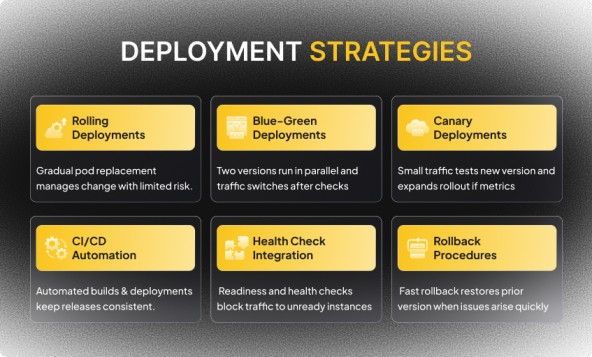
Rolling deployments replace pods gradually with new versions. Kubernetes terminates old pods while creating new pods according to configured parameters. Set maxSurge to control how many extra pods run during deployment and maxUnavailable to limit how many pods can be offline simultaneously. Rolling deployments work well for backward-compatible changes but can cause issues if new and old versions can't coexist.
Rolling deployments replace pods gradually with new versions. Kubernetes terminates old pods while creating new pods according to configured parameters. Set maxSurge to control how many extra pods run during deployment and maxUnavailable to limit how many pods can be offline simultaneously. Rolling deployments work well for backward-compatible changes but can cause issues if new and old versions can't coexist.
Blue-Green Deployments
Blue-green deployments run old and new versions simultaneously, then switch traffic atomically. Deploy the new version to a separate set of pods while keeping the old version serving traffic. Validate the new version thoroughly, then update the Service selector to route traffic to the new pods. If problems occur, switch back to the old version instantly. Blue-green deployments require double the resources during the deployment window.
Blue-green deployments run old and new versions simultaneously, then switch traffic atomically. Deploy the new version to a separate set of pods while keeping the old version serving traffic. Validate the new version thoroughly, then update the Service selector to route traffic to the new pods. If problems occur, switch back to the old version instantly. Blue-green deployments require double the resources during the deployment window.
Canary Deployments
Canary deployments expose new versions to a small percentage of traffic before full rollout. Deploy new version pods alongside stable version pods. Configure the load balancer to send 10% of traffic to the canary. Monitor error rates, latency, and business metrics. Gradually increase canary traffic if metrics look healthy. Roll back if canary metrics degrade.
Canary deployments expose new versions to a small percentage of traffic before full rollout. Deploy new version pods alongside stable version pods. Configure the load balancer to send 10% of traffic to the canary. Monitor error rates, latency, and business metrics. Gradually increase canary traffic if metrics look healthy. Roll back if canary metrics degrade.
CI/CD Automation
Deployment automation through CI/CD pipelines ensures consistency. Use Cloud Build to compile code, run tests, build container images, and deploy to GKE automatically when code merges to the main branch. Configure deployment pipelines with approval gates for production deployments.
Deployment automation through CI/CD pipelines ensures consistency. Use Cloud Build to compile code, run tests, build container images, and deploy to GKE automatically when code merges to the main branch. Configure deployment pipelines with approval gates for production deployments.
Health Check Integration
Health checks during deployments prevent serving traffic to pods that aren't ready. Configure readiness probes that verify database connections, cache warming, and configuration loading before allowing traffic. Set initialDelaySeconds to account for startup time.
Health checks during deployments prevent serving traffic to pods that aren't ready. Configure readiness probes that verify database connections, cache warming, and configuration loading before allowing traffic. Set initialDelaySeconds to account for startup time.
Rollback Procedures
Rollback procedures recover from failed deployments quickly. Keep previous versions of container images in Artifact Registry. Use kubectl rollout undo to revert to the previous deployment. Automate rollbacks based on error rate thresholds or failed health checks.
Rollback procedures recover from failed deployments quickly. Keep previous versions of container images in Artifact Registry. Use kubectl rollout undo to revert to the previous deployment. Automate rollbacks based on error rate thresholds or failed health checks.
10. Cost Optimization
Cost management maintains profitability when you build a cloud-native SaaS backend on GCP. Optimize resource usage without compromising performance or reliability.
Right-Sizing Resources
Right-sizing instances matches machine types to workload requirements. Don't provision 32 CPU cores for a service that uses 2 cores. Use GKE's resource recommendations to identify over-provisioned deployments. Set appropriate CPU and memory requests based on actual usage patterns rather than guesses.
Right-sizing instances matches machine types to workload requirements. Don't provision 32 CPU cores for a service that uses 2 cores. Use GKE's resource recommendations to identify over-provisioned deployments. Set appropriate CPU and memory requests based on actual usage patterns rather than guesses.
Committed Use Discounts
Committed use discounts reduce costs for predictable workloads. Purchase one-year or three-year commitments for baseline capacity that runs continuously. Committed use discounts provide up to 57% savings compared to on-demand pricing. Use on-demand capacity for traffic that varies significantly.
Committed use discounts reduce costs for predictable workloads. Purchase one-year or three-year commitments for baseline capacity that runs continuously. Committed use discounts provide up to 57% savings compared to on-demand pricing. Use on-demand capacity for traffic that varies significantly.
Preemptible Instances
Preemptible instances cost 80% less than regular instances but can be terminated with 30 seconds' notice. Use preemptible instances for batch processing, CI/CD workloads, and fault-tolerant applications that can handle interruptions. Configure node pools with preemptible nodes for non-critical workloads.
Preemptible instances cost 80% less than regular instances but can be terminated with 30 seconds' notice. Use preemptible instances for batch processing, CI/CD workloads, and fault-tolerant applications that can handle interruptions. Configure node pools with preemptible nodes for non-critical workloads.
Scaling to Zero
Autoscaling to zero eliminates costs during idle periods. Cloud Run scales to zero automatically when receiving no traffic. Configure GKE node pools to scale to zero for development and staging clusters used only during business hours.
Autoscaling to zero eliminates costs during idle periods. Cloud Run scales to zero automatically when receiving no traffic. Configure GKE node pools to scale to zero for development and staging clusters used only during business hours.
Storage Cost Management
Storage costs accumulate from container images, database backups, and logs. Set lifecycle policies to delete old container image versions after 90 days. Configure log retention periods based on compliance requirements rather than keeping everything forever. Use cheaper storage classes for infrequently accessed data.
Storage costs accumulate from container images, database backups, and logs. Set lifecycle policies to delete old container image versions after 90 days. Configure log retention periods based on compliance requirements rather than keeping everything forever. Use cheaper storage classes for infrequently accessed data.
Network Egress Optimization
Network egress costs add up when transferring data out of GCP. Keep traffic within the same region when possible. Use Cloud CDN to cache static content at edge locations, reducing origin server load and egress costs. Compress data before transmission.
Network egress costs add up when transferring data out of GCP. Keep traffic within the same region when possible. Use Cloud CDN to cache static content at edge locations, reducing origin server load and egress costs. Compress data before transmission.
Conclusion
Building a cloud-native SaaS backend on GCP requires understanding microservices architecture, container orchestration, and managed services. Start with a clear microservices design, separating concerns by business capability. Containerize services using Docker with security practices built in from the beginning.
Deploy to GKE for mature orchestration or Cloud Run for serverless simplicity. Configure intelligent load balancing with health checks that verify actual service readiness. Implement comprehensive observability using Cloud Operations for metrics, logs, and traces. The architecture outlined here adapts to your growth and provides the reliability customers expect.
Deploy to GKE for mature orchestration or Cloud Run for serverless simplicity. Configure intelligent load balancing with health checks that verify actual service readiness. Implement comprehensive observability using Cloud Operations for metrics, logs, and traces. The architecture outlined here adapts to your growth and provides the reliability customers expect.
FAQs
1. What makes a backend truly cloud-native on GCP?
A backend is cloud-native when it uses containers, orchestration platforms like GKE, and managed services for infrastructure components. cloud-native architecture scales automatically and recovers from failures without manual intervention.
2. Should I use GKE or Cloud Run for my SaaS backend?
Use GKE when you need full control over networking, scaling policies, and deployment strategies. Use Cloud Run when you want serverless container execution without managing infrastructure. Many platforms use both for different services.
3. How do I handle database connections in containerized environments?
Use connection pooling to reuse connections across requests. Cloud SQL Proxy manages authentication and encryption automatically. Configure appropriate pool sizes based on expected concurrent requests.
4. What autoscaling metrics work best for SaaS backends?
Start with CPU utilization for compute-intensive services. Add custom metrics like request queue depth or latency percentiles for application-aware scaling. Combine multiple metrics for robust scaling decisions.
5. How do I ensure zero-downtime deployments?
Configure readiness probes that verify service readiness before accepting traffic. Use rolling deployments or canary strategies with proper health checks. Implement connection draining to complete in-flight requests before terminating pods.

Written by / Author
Manasi Maheshwari
Found this useful? Share With
Top blogs
Most Read Blogs
Wits Innovation Lab is where creativity and innovation flourish. We provide the tools you need to come up with innovative solutions for today's businesses, big or small.
© 2026 Wits Innovation Lab, All rights reserved
Crafted in-house by WIL’s talented minds